- Advertisement
- Cinematic
- Natural Photography
- Social Media
- Travel
- ChatGPT
- Gemini
- Google Flow Ai
- Ideogram
- Kling
- Leonardo
- Midjourney
- Nano Banana
- Sora
How to Craft the Ultimate Cinematic Elephant AI Image Prompt
By photoeditprompts.in · Updated November 15, 2026
Prompt
0
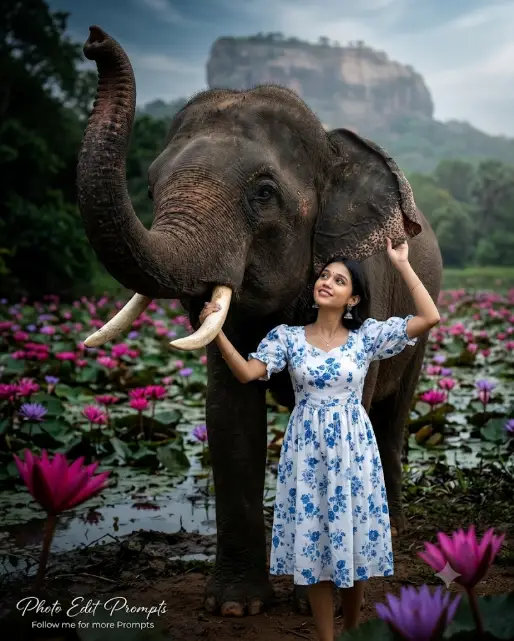
Create an extraordinary ultra-photorealistic, world-class cinematic wildlife and traditional fashion editorial photograph in a vertical 4:5 aspect ratio. Use the uploaded reference image as the primary reference for the woman's facial identity, outfit, and intended interaction. The image must possess a breathtaking, high-end professional "steel-photo" aesthetic—meaning incredibly sharp resolution, rich micro-contrast, flawless archival gallery-print quality, and a pristine cinematic finish captured by a flagship Sony Alpha DSLR camera. MAIN SUBJECT — ELEPHANT (FULL BODY):
A magnificent, enormous Asian elephant. CRITICAL: The entire complete body of the elephant must be fully visible in the frame from head to tail, down to its feet on the ground. It stands closely beside a beautiful young adult woman. Its massive head and body dominate the composition. Its head is slightly elevated, with its long trunk raised high and gracefully curling upward toward the upper-left side. Preserve realistic elephant anatomy, intricate natural wrinkles, rough skin texture, and distinctive pink-speckled pigmentation across its trunk, forehead, and large ears. Its visible eye must be sharply detailed. The elephant has a calm, majestic expression. WOMAN & FACIAL IDENTITY:
Preserve the exact facial identity, facial proportions, defining features, natural skin texture, and recognizable appearance of the reference woman. She stands naturally beside the elephant's head and shoulder, with a graceful expression and clearly visible face. OUTFIT:
She wears a beautiful white knee-length frock with short puff sleeves (borichchi ath), a simple round neckline, and delicate small blue floral patterns distributed across the fabric. Preserve the original design, feminine silhouette, and realistic fabric texture. POSE & INTERACTION — CRITICAL:
The elephant stands beside the woman with its trunk raised high, clearly visible without covering her face. One of the woman's hands gently rests on top of one visible elephant tusk, with naturally relaxed fingers. Her other hand gently holds the outer edge of the elephant's large ear near its lower side. Both arms must be separately positioned, with natural elbow bends and anatomically correct hands. She slightly tilts her head upward, looking toward the elephant with a peaceful, affectionate expression. Maintain believable physical contact, realistic proportions, and natural interaction. BACKGROUND — SIGIRIYA LOTUS LAKE:
Set the scene beside a beautiful Sri Lankan freshwater lake filled with abundant blooming pink, magenta, and purple lotus flowers. Surround the lake with lush tropical greenery and beautiful natural vegetation. In the distant background, the iconic Sigiriya Rock Fortress rises majestically above the landscape and remains recognizable. Create a rich, moody cinematic background featuring deep forest greens, dark emerald foliage, muted olive tones, and atmospheric shadows. The lake should have subtle natural reflections. Keep the lotus flowers vibrant against the darker surroundings. Sigiriya should remain recognizable through gentle atmospheric depth and soft optical background blur. CAMERA ANGLE & COMPOSITION — HIGHEST PRIORITY:
EXTREME LOW-ANGLE PHOTOGRAPHY. Position the camera approximately 30–45 cm above ground level, significantly below the woman's waist, with the lens distinctly tilted upward toward both subjects. The photographer must be physically positioned close to ground level, looking upward. The elephant's head, raised trunk, and full body must appear towering above the camera. The woman's face and upper body must also be photographed from below. Use a slightly upward-facing three-quarter perspective, emphasizing the elephant's enormous scale and creating dramatic visual depth. This must unmistakably look like a ground-level upward photograph, NOT an eye-level portrait. CINEMATIC LIGHTING & COLOUR GRADING:
Create dramatic yet natural cinematic lighting. Illuminate the woman's face, white floral dress, and the elephant's forehead, trunk, ears, and skin with beautiful soft directional light. Add subtle rim lighting around their silhouettes to separate them from the darker background. Use rich forest greens, deep cinematic shadows, vibrant pink lotus flowers, natural elephant skin tones, and luminous whites. Maintain realistic skin tones, detailed highlights, controlled shadows, and sophisticated cinematic colour grading. Keep both main subjects brighter and sharper than the background. CAMERA & TECHNICAL QUALITY:
Captured on a Sony Alpha flagship full-frame professional DSLR (e.g., Sony A1 or A7R V), 50mm G-Master lens, f/2.8, ISO 100, 1/1000s. Ground-level camera placement, upward-tilted lens, dramatic low-angle wildlife portrait composition, precise focus on the woman's face and elephant's eye, shallow depth of field, natural optical bokeh, exceptional dynamic range, and a premium "steel-photo" gallery-print look with exceptional edge-to-edge sharpness and micro-contrast. FINAL QUALITY:
Ultra-photorealistic 8K UHD, authentic professional DSLR appearance, world-class IMAX-level cinematic wildlife and fashion photography, lifelike facial details, realistic elephant anatomy, detailed skin textures, natural fabric folds, accurate hands, vibrant colours, and breathtaking visual realism. STRICT NEGATIVE INSTRUCTIONS:
No eye-level photography, no chest-level camera, no face-level camera, no overhead view, no straight-on horizontal perspective, no cartoon, no illustration, no painting, no 3D render, no CGI, no artificial skin, no facial identity changes, no altered outfit, no extra trunk, no duplicated ears, no distorted tusks, no deformed hands, no extra fingers, no incorrect hand positions, no trunk covering the face, no miniature elephant, no cropping of the elephant's feet or back, no bright washed-out background, no flat lighting, no completely black background, no excessive blur, no text, no photographer logo, and no borders. TEXT OVERLAY:
Add a small, elegant and professional watermark in the bottom-left corner. First line: “Photo Edit Prompts” in clear, pinyon script font white typography. Second line: “Follow me for more Prompts” in smaller, clean white typography. Keep the watermark subtle, refined, legible and unobtrusive, with no box, border or background panel. The watermark must be placed only in the bottom-left corner. Ensure that it does not cover the woman's face, body or important visual elements.
Negative prompt
STRICT NEGATIVE INSTRUCTIONS:
No eye-level photography, no chest-level camera, no face-level camera, no overhead view, no straight-on horizontal perspective, no cartoon, no illustration, no painting, no 3D render, no CGI, no artificial skin, no facial identity changes, no altered outfit, no extra trunk, no duplicated ears, no distorted tusks, no deformed hands, no extra fingers, no incorrect hand positions, no trunk covering the face, no miniature elephant, no cropping of the elephant's feet or back, no bright washed-out background, no flat lighting, no completely black background, no excessive blur, no text, no photographer logo, and no borders.
Hashtags
- Aspect ratio
- 1:1 (1024×1024)1200×10001200×6281920×1080 (16:9)4:5 (1080×1350)9:16 (1080×1920)
- Quality
- 1080p4K8K
- Prompt type
- Direct prompt
You may also read
More articles →- AI Photo Edit
7 Best Chhath Puja Prompt Ideas for Cinematic AI Portraits
- AI Mobile Wallpapers Free
5 Unique 8K Cinematic Chhath Puja Devotional Portrait Prompts: You must try
- AI Cineatic 8K Video Prompt
Best Ai Love Couple Video Prompt Free Download
- Action Picture Generate Prompts
Diwali AI Video Prompt Download for Creating Festival Greeting Videos
How to use this prompt
- Press Copy prompt to copy the full prompt.
- Open ChatGPT and start a new image.
- Paste the prompt and set the aspect ratio to 1:1 (1024×1024).
- Add the negative prompt in the negative prompt field, if your tool has one.
- Generate, then adjust a few words to make it your own.
More prompts like this
How to Capture the Perfect Coca-Cola Can Image Prompt (opens in a new tab)
photoeditprompts.in
How to Create the Viral 3-Panel Cinematic Portrait Trend Using AI (opens in a new tab)
photoeditprompts.in
How to Create Stunning Layered AI Portraits (opens in a new tab)
photoeditprompts.in
3D Pop-Out Smartphone Portal Prompt (opens in a new tab)
photoeditprompts.in
Cinematic Close-Up Portrait Prompt (opens in a new tab)
photoeditprompts.in
Cinematic Low-Key Portrait Prompt (opens in a new tab)
photoeditprompts.in
Cinematic Toddler Adventure Poster Prompt (opens in a new tab)
photoeditprompts.in
Facebook 3D Cartoon AI Photo Editing Prompt (opens in a new tab)
photoeditprompts.in