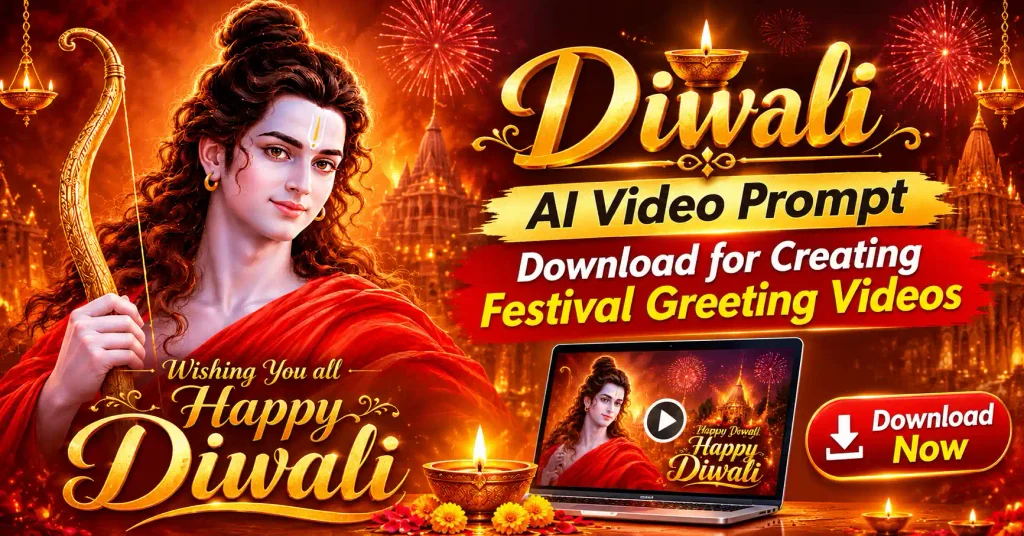

Diwali is a time to share happiness, light, and good wishes with your family and friends.
You can make your festival greetings more personal by creating your own AI video with diyas, beautiful lights, flowers, and traditional decorations.
If you want to create a Diwali greeting for WhatsApp Status, Instagram Reels, or Facebook,
this Diwali ai video prompt download article gives you a simple prompt to get started.
Copy the prompt, use it in an AI video generator, and create your own festive greeting video.
Diwali AI Video Prompt Download
If you are looking for your own diwali video prompt, this Diwali ai video prompt download will help you step by step to achieve that within a few minutes.
Also read
Best AI Prompts to Restore Old Family Photos in 4K Quality (opens in a new tab)
Prompts to Restore Old Family Photos in 4K Quality: Old family photographs preserve memories of people, places, and moments that…
You can use this prompt to create a traditional Diwali greeting video with a beautiful festive background.
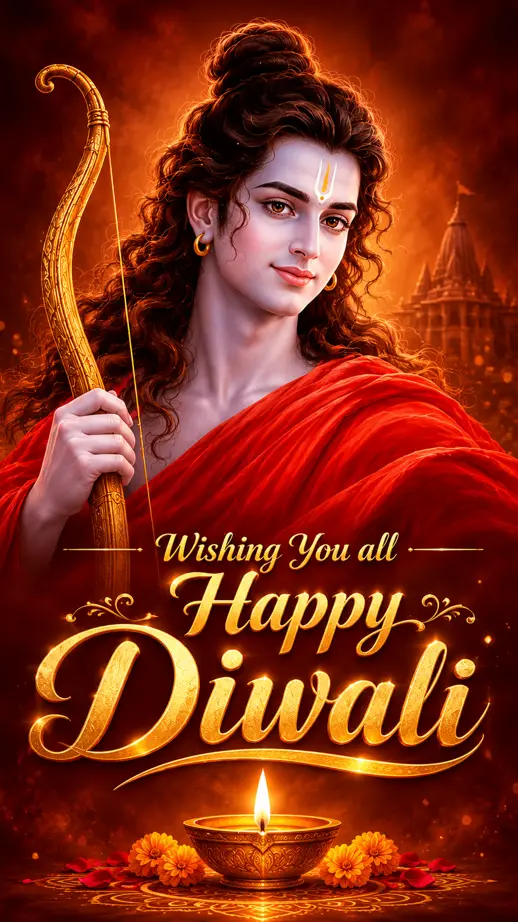
You need this resource image of God ram or you can choose a new image of Raghuvir.
AI Video Prompt
Create a beautiful and realistic Diwali festival greeting video in a traditional Indian home.
Show a decorated entrance with glowing diyas, colourful rangoli, marigold flowers, decorative lights, and a peaceful festive evening atmosphere.
The camera slowly moves toward the entrance while warm golden lights glow around the scene.
This prompt reflects beautiful arrangement of diyas and flowers along with a message.
Create an ultra-realistic, premium Bollywood-style devotional cinematic motion poster using the uploaded image as the EXACT first-frame visual reference.

,FORMAT & QUALITY,
- Duration: 8 seconds
- Aspect ratio: 9:16 vertical, YouTube Shorts
- Frame rate: 24 FPS
- Cinematic 4K visual quality
- Premium theatrical movie-title presentation
- Natural, physically believable motion
- Seamless visual continuity with the original image

,STRICT CHARACTER AND COMPOSITION PRESERVATION,

Preserve the exact appearance, facial identity, facial proportions, skin tone, hairstyle, topknot, tilak, earrings, clothing, golden bow, and overall character design of Lord Rama from the source image.

Do not redesign, reinterpret, or regenerate the character. Keep his body proportions and original position consistent throughout the video.

,SCENE 1 — 0.0 TO 2.0 SECONDS | DIVINE AWAKENING,

Begin with the exact original composition.

A very slow, elegant cinematic camera push-in begins, almost imperceptibly.

Lord Rama gently raises his gaze toward the camera. His head makes a subtle, natural movement, followed by a soft, peaceful smile. His expression remains divine, compassionate, warm, and serene.

His eyes should move naturally, with realistic eyelid motion and subtle facial muscle movement. Avoid exaggerated expressions.

A gentle breeze moves a few loose strands of his long hair and softly ripples the red silk fabric across his shoulder.

,SCENE 2 — 2.0 TO 4.0 SECONDS | DIVINE ATMOSPHERE,

The camera continues a smooth, controlled cinematic push-in.

The background becomes alive with extremely subtle floating golden dust particles, delicate glowing embers, and soft atmospheric haze.

Particles drift naturally at different depths, creating realistic cinematic depth without distracting from the character.

The diya flame begins with a subtle flicker, then gradually becomes brighter. Its golden illumination creates realistic reflections on the brass surface and a gentle warm glow on the surrounding environment.

Preserve the deep reddish-brown and golden color palette.

,SCENE 3 — 4.0 TO 5.0 SECONDS | THE TITLE REVEAL PREPARATION,

The camera movement gradually slows.

A soft golden light sweep travels elegantly across the lower portion of the frame.

The diya flame reaches a beautiful, steady golden glow.

The atmosphere becomes slightly more luminous, creating anticipation before the greeting appears.

,SCENE 4 — 5.0 TO 8.0 SECONDS | CINEMATIC DIWALI TITLE REVEAL,

Reveal the greeting in three beautifully timed stages, using elegant, premium gold calligraphy:

5.0–5.7 seconds:
"Wishing You all"

The words emerge gracefully through a soft golden light sweep, with subtle metallic highlights and a refined shadow.

5.7–6.5 seconds:
"Happy"

Reveal the word with an elegant cinematic golden shimmer and gentle light reflection.

6.5–7.5 seconds:
"Diwali"

Reveal the final word as the main visual highlight, with luxurious embossed gold lettering, delicate metallic reflections, elegant calligraphic flourishes, and a soft cinematic shadow.

The lettering must remain perfectly readable, correctly spelled, and visually consistent with the original festive design.

,FINAL MOMENT — 7.5 TO 8.0 SECONDS,

Hold the complete greeting:

"Wishing You all Happy Diwali"

Lord Rama maintains a gentle, peaceful smile while looking toward the camera.

The diya continues burning naturally. Golden particles drift softly in the background. The final frame feels warm, devotional, luxurious, and emotionally memorable.

,CINEMATOGRAPHY AND REALISM,

Professional Bollywood devotional cinematography, subtle anamorphic-inspired depth, physically accurate lighting, natural skin shading, realistic hair movement, refined fabric simulation, delicate volumetric light, soft golden reflections, controlled highlights, cinematic color grading, realistic depth of field, and smooth camera motion.

The animation should feel like a real professionally produced motion poster, not an artificial AI animation.

,STRICT NEGATIVE INSTRUCTIONS,

No face morphing, no identity changes, no facial distortion, no exaggerated head movement, no unnatural blinking, no lip movement, no speaking, no body deformation, no extra fingers, no changing hands, no bow deformation, no clothing transformation, no floating objects, no random camera shake, no excessive particles, no flashing lights, no cartoon effects, no artificial plastic skin, no oversaturated colors, no sudden transitions, no flickering background, no text distortion, no spelling mistakes, and no additional text or logos.Add gentle light reflections, realistic decorations, and a traditional Indian festive feeling.
Display the greeting text “Happy Diwali” in elegant golden lettering. Keep the text clear, correctly spelled, and easy to read.
The prompt uses the realistic lighting, smooth camera movement, rich festive colours, and a cinematic video style.
Create a vertical 9:16 video suitable for WhatsApp Status, Instagram Reels, and Facebook Stories.
Ensure your prompt keep the scene clean and attractive. Do not add extra text, logos, or watermarks.
How to Use the Diwali AI Video Prompt
I am using Google Flow as my image to video making tool, You can choose Grok or Kling ai for the same.
But, I believe the Google Flow is the best for Diwali ai video prompt execute seamlessly with no artifial looks.
You can follow these simple steps to create your greeting video.
- Open Google Flow app and login on it
- After login, Click “Project” button
- Copy the Diwali AI video prompt from this article.
- Open an AI video generator that supports text to video.
- Paste the prompt into the video creation box.
- Select a vertical format if you want to share your video on WhatsApp Status or Instagram Reels.
- Generate the video and check the final result.
- Save the video to your device and share it with your family and friends.
Some AI video tools also support image to video creation. You can upload a Diwali image and describe how you want the lights, camera movement, and festive decorations to appear.
Also read
15 Best AI Photo Enhancement Prompts to Make Any Photo Look Professional (opens in a new tab)
Nowadays, if you do not know Photoshop editing or have zero skills in image editing, AI photo enhancement prompts can…
Diwali Greeting Video Prompt Download
You can change the prompt to create different types of Diwali videos.
Create a traditional greeting with diyas, flowers, rangoli, and a decorated home entrance. Use warm lighting and a peaceful festive atmosphere.
Create a realistic video showing an Indian family celebrating Diwali together. Show the family decorating their home, lighting diyas, and enjoying the festive evening.
One more point is ensure that the prompt contains the scene natural and family friendly.
Create a beautiful evening scene with decorative lights, glowing diyas, colourful lanterns, and a traditional Indian home. Use smooth camera movement and realistic light reflections.
Also read
How to Create a Dhanteras Wish Video with Your Own Photo and Name Using AI (opens in a new tab)
Today, in this article, we will see how you can create a Dhanteras status video using your own image and…
You can change the greeting text to include your own message. For example, add a family greeting, a friend’s name, or a short festive wish.
Keep your prompt clear. Describe the background, decorations, camera movement, lighting, and greeting text. This gives the AI video generator a clear idea of the video you want.
AI Video Creation Trends in 2026
AI video creation is becoming more common in content production.
According to Wyzowl’s State of Video Marketing 2026 report, 63% of video marketers had used AI to create or edit videos. The figure increased from 51% in 2025.
Also read
Wedding Cinematic 8K Video Prompt (opens in a new tab)
Welcome to PhotoEditPrompts.com. You can create a realistic 8K cinematic wedding video using 8K video prompts. AI makes creating cinematic…
The same report found that 91% of businesses used video as a marketing tool in 2026.
These figures show that AI video tools are becoming part of the way people create video content. However, the statistics cover video marketing, not Diwali greeting videos specifically.
The Interactive Advertising Bureau reported in July 2025 that advertisers expected generative AI to contribute to 39% of digital video advertising creative in 2026, compared with 30% in 2025.
Also read
7 Happy dhanteras greetings with name (opens in a new tab)
This Dhanteras celebration is extra special with beautiful Happy Dhanteras greetings with name. You can create personalized festive wishes and…
These reports focus on businesses and advertising. They do not measure how many people create festival greeting videos. Still, they show the growing use of AI in video production.
You can use AI video tools for festival greetings, invitations, family celebrations, and social media content.
Download and Share Your Diwali AI Video
After generating your video, save it using the download option provided by your AI video tool.
You can check the video before sharing it. Make sure the greeting text looks correct and the video displays properly on your phone.
You can share your finished Diwali greeting through WhatsApp Status, Instagram Reels, Facebook Stories, or a personal message.
If you want to create another festival video, change the greeting text, decorations, and background.
You can also create a video for Dhanteras, Bhai Dooj, or another festival by changing the prompt to match the occasion.
FAQs
What is a Diwali AI video prompt?
A Diwali AI video prompt is a text description that tells an AI video generator how to create a festive video. It describes the decorations, lighting, camera movement, background, and greeting text.
How do I create a Diwali greeting video with AI?
You jst copy the prompt from this article, open an AI video generator, paste the prompt, and generate your video. Check the result, save it, and share it with your family and friends.
Can I use this Diwali video prompt for WhatsApp Status?
Yes. Use the vertical 9:16 format to create a video suitable for WhatsApp Status, Instagram Reels, and Facebook Stories.
Can I add my name to the Diwali AI video?
Yes. You can change the greeting text to include your name or a personal message. Check the generated video because AI tools sometimes produce incorrect text.
Can I create a Diwali video from my own photo?
Yes. If your AI video tool supports image to video creation, upload your photo and describe the movement, lighting, and festive effects you want.
How do I download my Diwali AI video?
After generating your video, use the download option available in your AI video tool. Download options, video quality, and usage limits depend on the service you use.
Conclusion
Diwali ai video prompt download: You can create a beautiful Diwali greeting video without spending hours editing it.
You can use this Diwali ai video prompt download article to create a festive video with diyas, flowers, lights, and traditional decorations.
Just you need to copy the prompt, generate your video, and share your Diwali wishes with your family and friends.
You can also change the background and greeting text to create a different festival video whenever you need one.