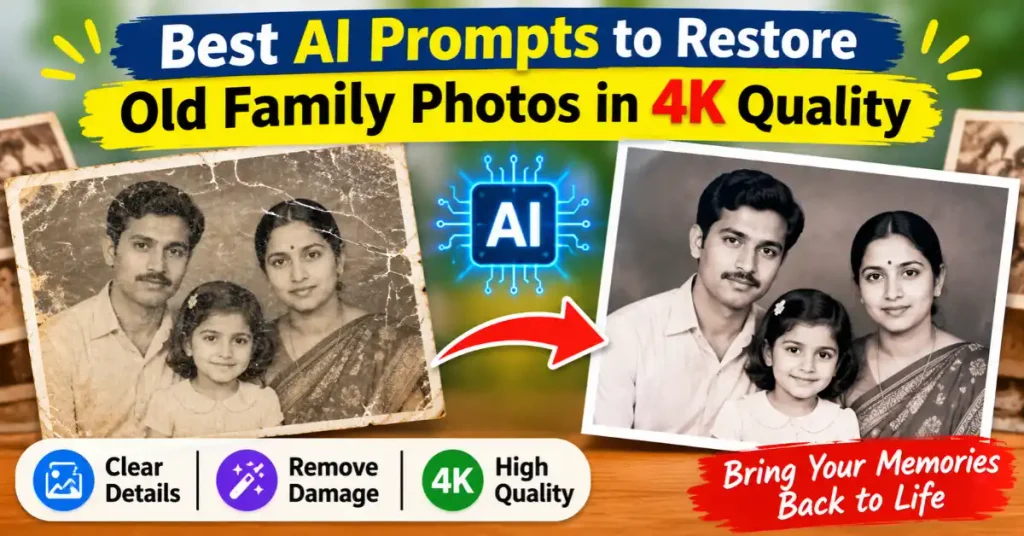

Prompts to Restore Old Family Photos in 4K Quality: Old family photographs preserve memories of people, places, and moments that may never happen again.
Unfortunately, years of storage can leave these photographs faded and damaged.
Some family photos are scratched, blurry, and stained after a long time.
In this era of AI, new technologies can restore these valuable images at no cost.
AI photo restoration tools can help repair many of these problems.
This blog brings you the right prompts. With them, you can improve clarity and remove visible damage from images in a few seconds.
Now, anyone can recover the faded colors, and prepare old photographs for high-resolution viewing.
However, restoration is not simply about making an image sharper or merging unmatched faces into one frame.
The most important goal is to preserve the original person’s identity including facial features, expression, clothing, and the character of the photograph.
This guide provides copy-and-paste Prompts to Restore Old Family Photos in 4K using AI image editors.
You are free to choose ChatGPT, Gemini, or other image restoration tools.
You will find prompts for damaged photographs, and faded portraits.
It is time to upscale your images with a few clicks.
Get ready to restore black-and-white images, blurry faces, wedding pictures, and family group photos, and enhance them to high resolution.
Best Prompt to Restore an Old Family Photo
This blog will guide you on how anyone can restore family photos without Photoshop skills or the Lightroom app or software.
The best part is that you can do it in a few simple steps without any expensive or paid software.
If you want to restore an old family photograph with one prompt, start with this:
Universal Old Photo Restoration Prompt
Restore this old family photograph naturally and carefully. Repair visible scratches, dust, stains, creases, fading, cracks, and other signs of damage. Improve image clarity, exposure, contrast, sharpness, and tonal balance while preserving the original person's identity, facial features, expression, age, hairstyle, clothing, pose, background, and composition.

Maintain realistic skin texture, natural lighting, and the original photographic character. Reconstruct damaged areas conservatively using details that can reasonably be inferred from the surrounding image. Do not beautify, de-age, reshape faces, change expressions, modernize clothing, replace the background, or invent facial details that are not visible in the original photograph.

Create a clean, natural, high-resolution restoration suitable for 4K viewing and printing. Keep the result authentic to the original photograph rather than making it look like a newly generated portrait.AI may generate plausible-looking details that were never present in the original photograph.
So, before download the final image, always compare the restored image with the original scan.
1. Best AI Prompts to Restore Old Family Photos
These prompts are designed for different restoration problems.
One restoration prompt is not enough for all types of photo damage.
So, this blog includes multiple prompts with reference images to help you restore different types of photos.
You can upload your original photograph to an AI image editor, use a prompt from this article, and run it.
When the result appears, compare your output image with the original to check the visible damage.
Prompt 1: Restore an Old Family Photograph
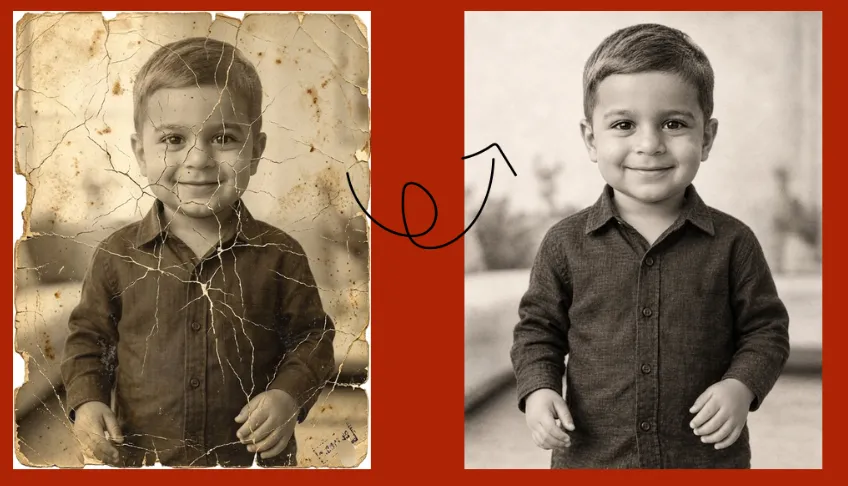
Restore this old family photograph into a clean, clear, and naturally detailed image. Remove visible dust, scratches, stains, fading, creases, and minor damage. Improve brightness, contrast, sharpness, and overall image quality without changing the original photograph's composition.

Preserve the exact identity of every person, including facial structure, eyes, nose, mouth, expression, apparent age, hairstyle, clothing, body proportions, and pose. Keep the original background, lighting direction, and photographic character unchanged.

Use realistic restoration with natural skin texture and authentic details. Do not beautify, modernize, replace faces, alter clothing, or create a different scene. The final result should look like the original family photograph carefully restored in high resolution.Prompt 2: Repair Scratches, Dust, and Stains
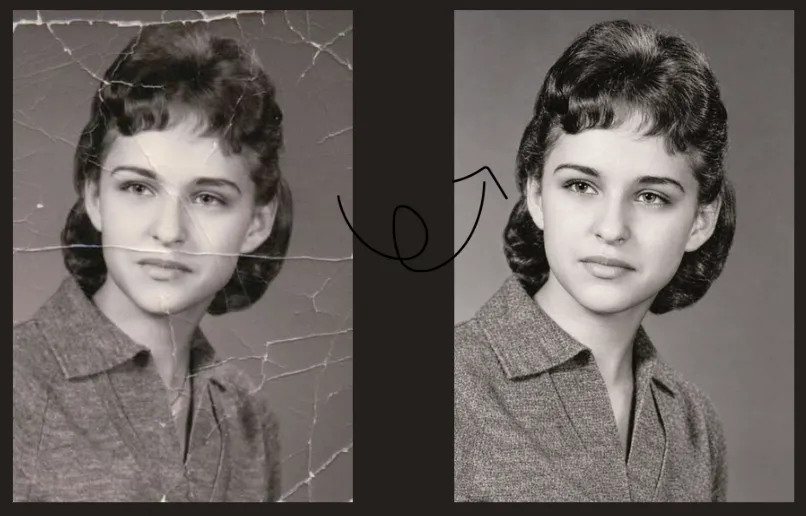
Carefully restore and enhance this damaged old photograph to achieve a clean, clear, natural, and professionally restored appearance while preserving its original authenticity. Remove visible scratches, dust particles, stains, fading, small marks, creases, and surface imperfections. Repair damaged areas by carefully reconstructing missing or deteriorated details using the surrounding photographic information. Improve clarity, contrast, brightness, and overall image quality without altering the original photograph. Strictly preserve the exact identity of every person, including facial features, facial structure, eyes, nose, mouth, expression, skin texture, hairstyle, apparent age, clothing, body proportions, and original pose. Maintain the original background, composition, lighting, perspective, and photographic details. Do not change, replace, reshape, or artificially enhance any person's face. Do not add, remove, or invent people, objects, or background elements. Avoid excessive smoothing, artificial sharpening, oversaturation, unrealistic skin texture, or overly modern effects. The final image should look like a carefully restored original photograph, not a newly generated image. Preserve its natural character, historical appearance, and genuine photographic details while achieving the highest possible clarity and resolution suitable for professional, high-resolution viewing. Restoration priority: Preserve the original photograph and its authenticity. Repair damage without changing the people, details, or overall appearance of the original image.Prompt 3: Restore a Faded Family Portrait
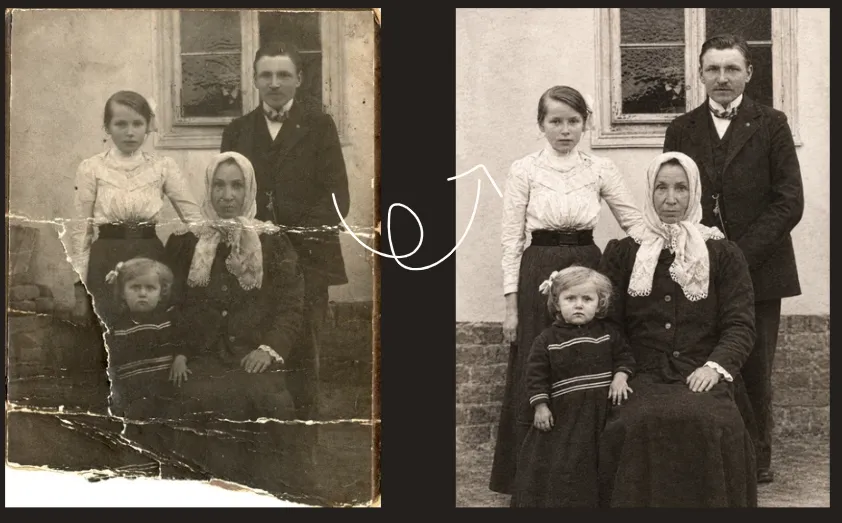
Professionally restore and enhance this faded old family portrait while preserving its original authenticity, natural appearance, and historical character. Carefully correct fading, improve brightness, contrast, tonal balance, color consistency, and overall clarity. Recover and enhance visible details in the faces, clothing, hair, and background while maintaining the photograph's original visual character. Strictly preserve the exact facial identity, facial features, expressions, skin texture, apparent age, hairstyle, clothing, body proportions, posture, and position of every family member. Ensure that all individuals remain exactly as they appear in the original photograph. Restore the original tonal depth and improve visibility without introducing artificial lighting, excessive sharpening, unnatural colors, or overly smooth skin. Maintain the original background, composition, camera perspective, lighting direction, and vintage photographic character. Do not replace, reshape, regenerate, or artificially enhance faces. Do not add, remove, or invent people, objects, clothing details, or background elements. Avoid modernizing the photograph or creating details that cannot be reliably recovered from the original image. The final result should look like a naturally preserved and professionally restored family photograph, with improved clarity, balanced tones, realistic details, and high-resolution quality. Restoration priority: Preserve the exact original family identities, expressions, composition, and vintage appearance. Enhance only the existing photograph without changing its original content or character.Prompt 4: Restore a Blurry Old Photograph
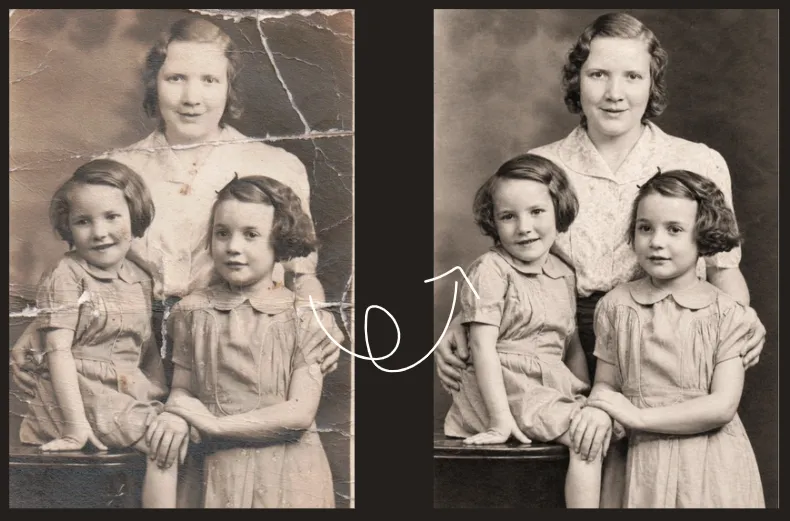
Professionally restore and enhance this blurry old photograph to improve its clarity, sharpness, and overall image quality while strictly preserving its original appearance and authenticity. Carefully reduce visible blur, haze, noise, softness, and loss of definition. Improve the clarity of existing facial features, hair, clothing, and background details. Recover visible photographic information as naturally as possible without inventing, exaggerating, or altering details that cannot be reliably supported by the original image. Strictly preserve the exact original identity, facial structure, eyes, nose, mouth, expression, apparent age, skin texture, hairstyle, clothing, body proportions, pose, and position of the person. Maintain the original composition, background, lighting, perspective, and photographic character. Apply balanced sharpening and natural detail enhancement. Preserve realistic skin texture and original photographic grain. Avoid excessive sharpening, artificial edge enhancement, oversmoothing, plastic-like skin, unnatural contrast, or unrealistic reconstruction. Do not reshape, regenerate, replace, or beautify the face. Do not change the person's identity, expression, age, hairstyle, clothing, or background. Do not add new objects or create artificial details. Avoid making the photograph look like a modern studio portrait or digitally generated image. The final result should look like the same original photograph, carefully restored with improved clarity, balanced sharpness, natural textures, and realistic high-resolution detail. Restoration priority: Preserve the original person's identity and photographic authenticity. Improve only the existing image information without changing the original appearance or character.Prompt 5: Restore an Extremely Faded Photograph
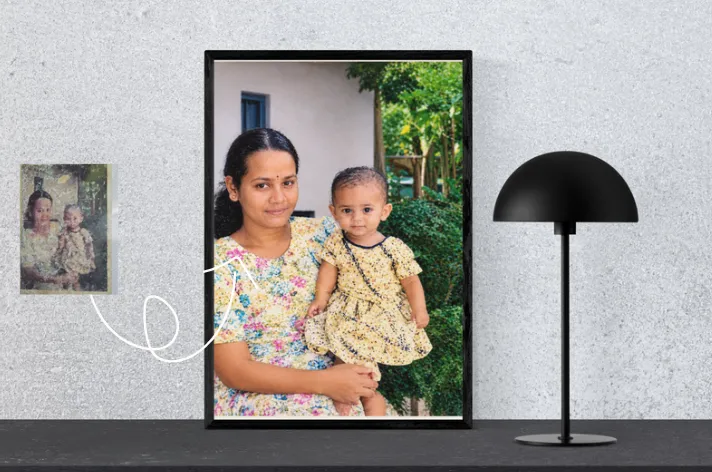
Professionally restore this extremely faded old family photograph using a careful, conservative, and authenticity-focused restoration approach. Carefully recover the remaining visible photographic information. Improve brightness, contrast, tonal balance, and clarity to make the existing details more visible. Reduce fading, discoloration, uneven tones, and minor surface imperfections while preserving the photograph's original character. Gently recover visible details in the faces, eyes, hair, clothing, and background using only information supported by the original photograph. Restore natural tonal depth without inventing facial features, expressions, textures, or missing photographic details. Strictly preserve the exact original identity, facial features, expressions, apparent age, skin texture, hairstyle, clothing, body proportions, positions, and poses of all family members. Maintain the original background, composition, perspective, and lighting wherever the information remains visible. Do not replace, regenerate, reshape, beautify, or artificially reconstruct faces. Do not add people, objects, clothing details, or background elements. Avoid excessive contrast, oversaturation, artificial colors, aggressive sharpening, plastic-like skin, or dramatic enhancement. If certain areas are too faded or damaged to recover reliably, retain their natural appearance rather than inventing details. Prioritize faithful restoration over complete reconstruction. The final image should look like the same original family photograph, carefully restored to improve visibility while retaining its genuine vintage appearance, natural textures, and historical character. Produce a clean, balanced, realistic, high-resolution restoration. Restoration priority: Preserve the original family identities and authentic photographic details. Recover only what can reasonably be supported by the source image. Do not create a new photograph or alter the original content.2. AI Prompts for Black-and-White and Color Photo Restoration
Your old black-and-white and faded color photographs require different approaches.
Must ensure that the prompt has the capability to preserve the original tonal range, and color restoration should correct fading without introducing unrealistic colors.
Prompt 6: Restore an Old Black-and-White Photograph
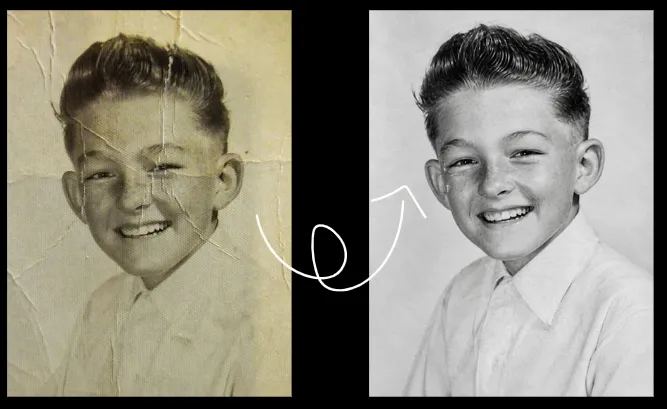
Professionally restore and enhance this old black-and-white photograph while strictly preserving its original monochrome appearance, authenticity, and historical character. Carefully remove visible scratches, dust particles, stains, creases, small marks, and minor surface damage. Repair damaged areas using the surrounding photographic information without inventing details or altering the original image. Improve exposure, contrast, tonal balance, brightness, and sharpness to recover visible details in the faces, hair, clothing, and background. Enhance the existing grayscale information while maintaining natural highlights, realistic shadows, and balanced black-and-white tones. Strictly preserve the exact original facial identities, facial features, expressions, apparent ages, skin texture, hairstyles, clothing, body proportions, poses, and positions of all people. Maintain the original background, composition, perspective, lighting direction, and photographic details. Preserve the original black-and-white appearance. Do not colorize the photograph, introduce artificial colors, change grayscale tones into a modern cinematic look, or apply unnecessary color effects. Retain realistic skin texture, natural grayscale transitions, and authentic photographic grain. Do not replace, regenerate, reshape, beautify, or artificially reconstruct faces. Do not add or remove people, objects, clothing details, or background elements. Avoid excessive smoothing, artificial sharpening, harsh contrast, crushed shadows, blown highlights, or unrealistic reconstruction. The final image should look like the same original black-and-white photograph, carefully restored with improved clarity, balanced grayscale tones, natural textures, and realistic high-resolution detail. Restoration priority: Preserve the original monochrome character, exact identities, and authentic photographic details. Repair damage and improve image quality without changing the original appearance or creating a new photograph.Prompt 7: Colorize an Old Black-and-White Family Photo
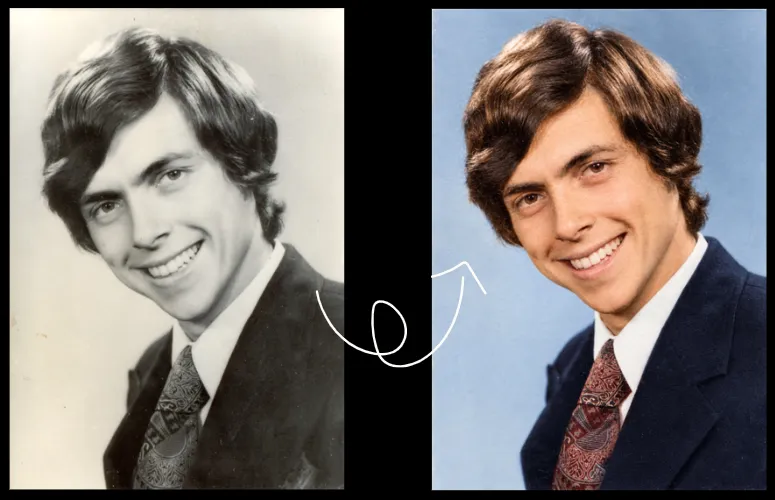
Professionally colorize this old black-and-white family photograph using natural, realistic, and historically appropriate colors while strictly preserving the original photograph's authenticity and character. Carefully introduce subtle, believable colors into the existing grayscale image. Apply natural-looking colors to the skin, hair, clothing, background, and visible objects. Use balanced, realistic color tones that complement the photograph's original lighting, shadows, and historical appearance. When the original colors are unknown, choose conservative, historically plausible color tones without presenting them as confirmed original colors. Avoid excessive saturation, modern fashion colors, artificial color effects, or dramatic cinematic grading. Strictly preserve the exact original identity, facial features, facial structure, eyes, nose, mouth, expression, apparent age, skin texture, hairstyle, clothing design, body proportions, pose, and position of every person. Maintain the original background, composition, perspective, lighting direction, and photographic details. Apply natural skin tones with realistic variations and authentic texture. Preserve the original shadows, highlights, depth, and tonal balance. Ensure that the colorization follows the existing photographic information rather than changing the original image. Do not replace, regenerate, reshape, beautify, or artificially reconstruct faces. Do not add makeup, change hairstyles, modernize clothing, or introduce new objects. Avoid plastic-like skin, oversmoothing, excessive sharpening, unrealistic colors, or artificial details. The final image should look like a naturally colorized version of the same original family photograph, with realistic colors, authentic textures, balanced lighting, and a preserved vintage photographic appearance. Restoration priority: Preserve the exact original family identities, expressions, clothing designs, composition, and historical character. Add only subtle, plausible colors without changing the original photograph or inventing unsupported historical details.Prompt 8: Restore a Faded Color Family Photograph
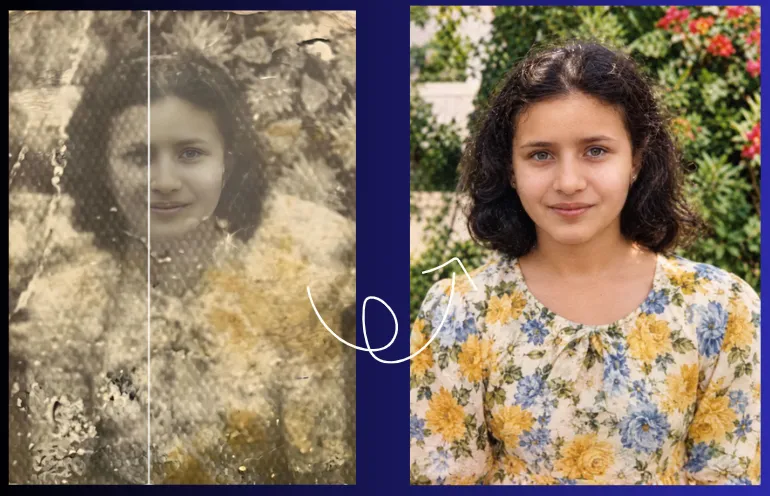
Professionally restore and enhance this faded old color family photograph while strictly preserving its original appearance, authenticity, and historical character. Carefully correct faded colors, discoloration, color shifts, uneven exposure, low contrast, and loss of clarity. Recover the original color balance and improve brightness, contrast, tonal depth, and overall image quality. Restore natural-looking colors in the skin, hair, clothing, background, and visible objects without changing the photograph's original character. Strictly preserve the exact identity of every person, including facial features, facial structure, eyes, nose, mouth, expressions, apparent age, natural skin texture, hairstyle, clothing design, body proportions, pose, and position. Maintain the original composition, background, perspective, lighting direction, and photographic details. Restore realistic skin tones and balanced colors while preserving natural highlights, shadows, and existing photographic textures. Improve the visibility of existing details without inventing missing information or introducing artificial color variations. Do not replace, regenerate, reshape, beautify, or artificially reconstruct faces. Do not change clothing, hairstyles, expressions, or background elements. Avoid oversaturated colors, unnatural skin tones, excessive sharpening, plastic-like skin, artificial smoothing, or modern cinematic effects. Preserve the original color photograph's natural appearance. Do not colorize it with unrelated colors, apply dramatic color grading, or make it look like a newly generated modern portrait. The final image should look like the same original family photograph, carefully restored with natural colors, balanced exposure, improved clarity, realistic textures, and high-resolution detail. Restoration priority: Preserve the exact original family identities, original colors wherever recoverable, composition, and photographic authenticity. Correct fading and damage without changing the original content or creating a new photograph.Prompt 9: Restore an Old Sepia Photograph
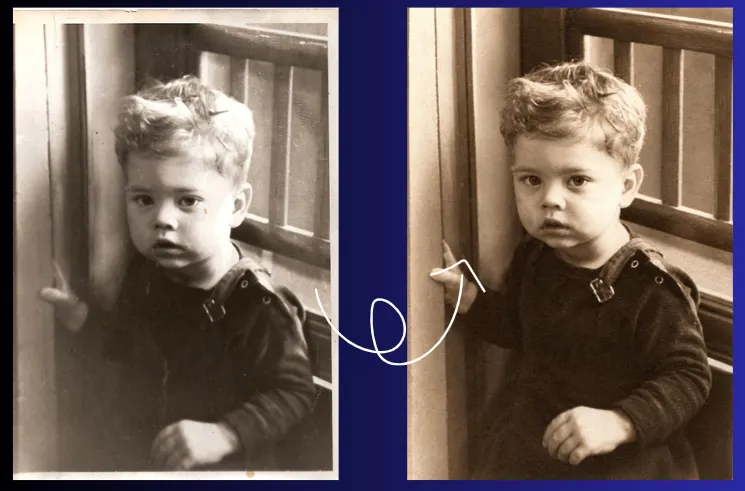
Professionally restore and enhance this old sepia family photograph using a careful, conservative, and authenticity-focused restoration approach. Preserve its original vintage appearance, historical character, and genuine photographic details while improving its overall quality. Carefully remove visible scratches, dust particles, stains, creases, fading, small marks, and minor surface damage. Repair damaged areas using the surrounding photographic information. Recover faded details and improve brightness, exposure, contrast, tonal balance, and clarity without changing the original photographic character. Maintain the authentic sepia tone throughout the restoration. Preserve the original warm brown, golden, and muted monochrome shades. Correct uneven fading and discoloration while keeping the photograph's natural vintage appearance. Do not convert the image into modern full color, black and white, or an artificially colorized photograph. Strictly preserve the exact identity of every person, including facial features, facial structure, eyes, nose, mouth, expressions, apparent age, natural skin texture, hairstyle, clothing, body proportions, posture, and position. Keep all family members exactly as they appear in the original photograph. Maintain the original background, composition, camera perspective, lighting direction, shadows, highlights, and visible photographic details. Do not change the arrangement of people, clothing designs, background objects, or other elements. Improve the clarity of existing details in the faces, hair, clothing, and background without inventing missing information. Recover visible photographic information using only details that can reasonably be supported by the original image. If certain areas are too faded or damaged to restore reliably, retain their natural appearance rather than creating artificial details. Avoid excessive sharpening, artificial contrast, oversaturation, plastic-like skin, unnatural smoothing, modern cinematic effects, dramatic lighting, or contemporary portrait enhancement. Do not replace, regenerate, reshape, beautify, or artificially reconstruct faces. Do not add, remove, or invent people, objects, or background elements. Preserve realistic photographic grain, natural textures, subtle tonal transitions, and the original image's soft vintage character. Apply balanced enhancement without making the photograph appear digitally manufactured. The final result should look like the same original sepia family photograph, carefully restored with improved clarity, balanced exposure, natural tonal depth, and realistic high-resolution detail. Restoration priority: Preserve the exact original family identities, authentic sepia tones, composition, and historical character. Repair damage and recover existing details without changing the original photograph or creating a new image.3. AI Prompts for Facial Detail and Identity Preservation
Face restoration prompts require particular care, especially when they are being developed.
AI image editors may interpret missing details instead of accurately recovering them.
You can use these prompts when the photograph contains recognizable family members, old portraits, wedding pictures, or childhood photographs.
Prompt 10: Restore Facial Details Without Changing Identity
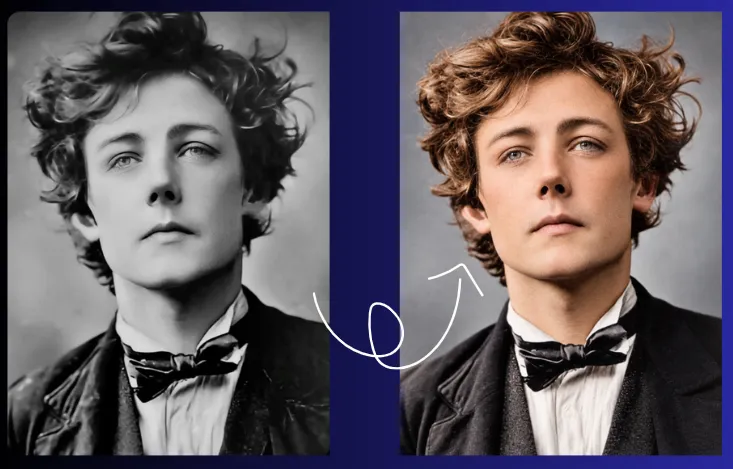
Professionally restore and enhance the facial details in this old family photograph while strictly preserving the person's original identity, natural appearance, and photographic authenticity. Carefully improve the visibility of existing facial details by reducing blur, haze, noise, softness, and loss of definition. Enhance natural clarity, balanced sharpness, and visible photographic information without inventing details or artificially reconstructing the face. Strictly preserve the exact original facial identity, face shape, facial structure, eyes, eyebrows, nose, lips, mouth, jawline, hairline, ears, expression, apparent age, skin texture, and natural asymmetry. Maintain the person's original hairstyle, clothing, pose, position, and overall appearance. Recover existing facial information using only details that can reasonably be supported by the original photograph. Improve the visibility of the eyes, eyebrows, nose, lips, and surrounding facial features without changing their original shape, position, proportions, or appearance. Preserve realistic skin texture, natural shadows, original lighting, and authentic photographic grain. Apply balanced sharpening and gentle clarity enhancement without creating artificial edges, excessive contrast, or unrealistic facial definition. Do not beautify, de-age, reshape, replace, regenerate, or reinterpret the face. Do not change the person's expression, apparent age, skin tone, hairstyle, or identity. Avoid artificial skin smoothing, plastic-like textures, exaggerated sharpening, modern portrait effects, or digitally generated facial details. Do not invent missing facial information or reconstruct damaged features beyond what can reasonably be inferred from the original image. If certain details are unclear or missing, preserve their natural appearance rather than creating unsupported information. Maintain the original background, composition, lighting, perspective, and photographic character. The final image should look like the same person in the original photograph, carefully restored with improved facial clarity, natural texture, realistic detail, and high-resolution quality. Restoration priority: Preserve the exact original facial identity and authentic expression. Improve only the existing photographic information without changing the person's appearance or creating a new portrait.Prompt 11: Restore an Old Wedding Photograph
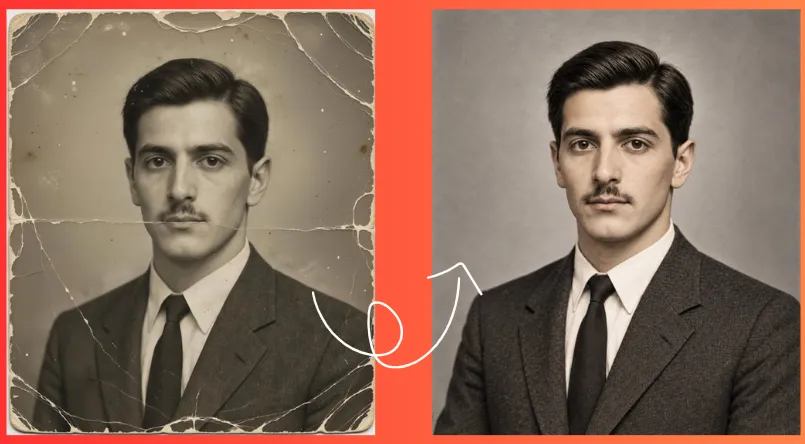
Professionally restore and enhance this old wedding photograph with careful attention to the original people, wedding attire, decorations, and authentic photographic details.

Carefully remove visible scratches, dust particles, stains, creases, fading, and minor surface damage. Repair damaged areas using surrounding photographic information without inventing missing details. Improve exposure, brightness, contrast, tonal balance, clarity, and sharpness while preserving the original composition and photographic character.

Strictly preserve the exact identity of every person, including facial features, facial structure, eyes, nose, mouth, expressions, apparent age, natural skin texture, hairstyle, body proportions, posture, and position. Keep all individuals exactly as they appear in the original photograph.

Preserve the original wedding clothing, traditional attire, fabric patterns, embroidery, jewellery, accessories, hairstyles, and decorative elements. Maintain the original clothing designs, colours where visible, arrangement, and authentic wedding details without introducing modern styling.

Keep the original wedding background, decorations, flowers, furniture, surroundings, lighting, shadows, camera perspective, and composition unchanged. Do not remove, replace, or rearrange any wedding elements.

Improve the visibility of existing details in the faces, clothing, jewellery, fabric textures, and background without artificially reconstructing or changing their appearance. Recover only information that can reasonably be supported by the original photograph.

Do not replace, regenerate, reshape, beautify, or artificially enhance faces. Do not change facial expressions, apparent ages, hairstyles, clothing, jewellery, poses, or body proportions. Avoid excessive sharpening, artificial skin smoothing, plastic-like textures, oversaturated colours, dramatic lighting, or modern cinematic effects.

Preserve realistic skin texture, natural photographic grain, original shadows, and the genuine atmosphere of the wedding photograph.

The final image should look like the same original wedding photograph, carefully restored with improved clarity, balanced exposure, natural details, and realistic high-resolution quality.

Restoration priority: Preserve the exact original identities, wedding attire, jewellery, decorations, composition, and historical character. Repair damage and improve image quality without changing the original wedding details or creating a new photograph.Prompt 12: Restore an Old Childhood Photograph
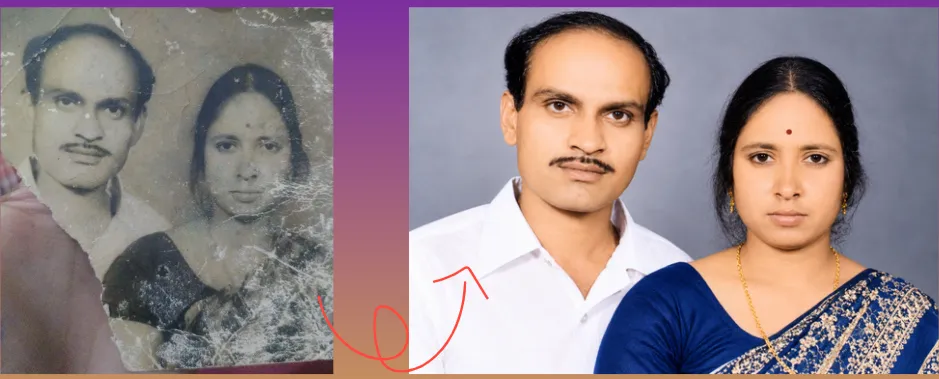
Professionally restore and enhance this old childhood photograph while strictly preserving the child's original appearance, identity, and authentic photographic character. Carefully remove visible scratches, dust particles, stains, fading, creases, blur, noise, and minor surface damage. Repair damaged areas using the surrounding photographic information without inventing missing details. Improve brightness, exposure, contrast, tonal balance, clarity, and sharpness while maintaining the photograph's natural appearance. Strictly preserve the exact original facial identity, facial structure, eyes, eyebrows, nose, lips, expression, apparent age, natural skin texture, hairstyle, clothing, body proportions, pose, and position. The child must remain exactly the same person as in the original photograph. Improve the visibility of existing details in the face, hair, clothing, and background without changing their original appearance. Recover visible photographic information carefully and naturally. Maintain realistic skin texture, natural shadows, original lighting, and authentic photographic grain. Do not replace, regenerate, reshape, beautify, de-age, or artificially reconstruct the child's face. Do not make the child look older or younger. Do not change facial proportions, eye shape, expression, hairstyle, clothing design, pose, or background. Avoid beauty filters, artificial skin smoothing, plastic-like textures, excessive sharpening, exaggerated contrast, or modern portrait effects. Preserve the original composition, camera perspective, background elements, and photographic atmosphere. Do not add, remove, or invent people, objects, clothing details, or surroundings. If certain facial details are damaged or missing, restore only what can reasonably be supported by the original image. Avoid creating unsupported facial features or changing the child's natural appearance. The final image should look like the same original childhood photograph, carefully restored with improved clarity, balanced tones, natural textures, and realistic high-resolution detail. Restoration priority: Preserve the child's exact identity, original age, expression, and authentic childhood appearance. Repair damage and enhance existing details without changing the original photograph or creating a new portrait.Prompt 13: Restore a Family Group Photograph
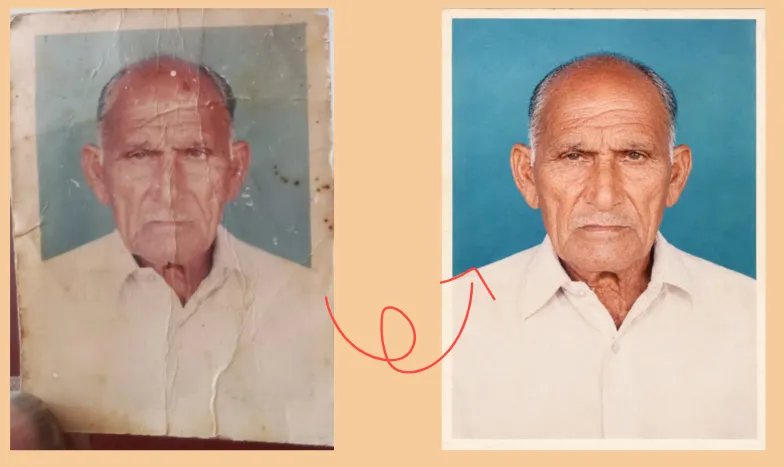
Professionally restore and enhance this old family group photograph using a careful, conservative, and identity-preserving restoration approach. Preserve every person in the original image and maintain the photograph's authentic appearance, composition, and historical character. Carefully remove visible scratches, dust particles, stains, fading, creases, minor blur, and surface damage. Repair damaged areas using the surrounding photographic information without inventing missing details. Improve brightness, exposure, contrast, tonal balance, clarity, and sharpness while maintaining natural photographic textures. Strictly preserve the exact identity of every family member, including facial features, facial structure, eyes, eyebrows, nose, mouth, expressions, apparent age, natural skin texture, hairstyle, clothing, body proportions, posture, and position. Every person must remain exactly as they appear in the original photograph. Preserve the original number of people, their individual identities, relationships, positions, spacing, poses, and arrangement. Do not merge faces, remove people, add people, duplicate individuals, change relationships, rearrange the group, or alter anyone's appearance. Maintain the original background, composition, camera perspective, lighting direction, shadows, and visible surroundings. Do not replace, redesign, or artificially reconstruct the background or introduce new objects. Give equal attention to every visible family member. Improve the clarity of existing facial details, clothing, hair, and other photographic elements without applying aggressive enhancement or artificial facial reconstruction. Do not replace, regenerate, reshape, beautify, de-age, or artificially enhance faces. Avoid plastic-like skin, excessive smoothing, exaggerated sharpening, unrealistic contrast, modern portrait effects, or invented facial details. If certain areas are damaged, blurred, or missing, restore only information that can reasonably be supported by the original image. Preserve uncertain details naturally rather than creating unsupported features. The final image should look like the same original family group photograph, carefully restored with balanced exposure, natural clarity, realistic textures, and high-resolution detail. Restoration priority: Preserve every original person, exact identities, expressions, positions, relationships, and composition. Repair damage without changing the family group or creating a new photograph.4. AI Prompts for 4K Photo Enhancement and Upscaling
I will clarify one more point here: restoration and upscaling are related but different processes.
A good prompt can repair visible damage and improve the photograph’s appearance.
The prompts on this page can also upscale images, increase their dimensions, and add texture or detail.
For the most natural result, restore the photograph first and upscale it afterward.
Prompt 14: Enhance an Old Family Photo to 4K Quality
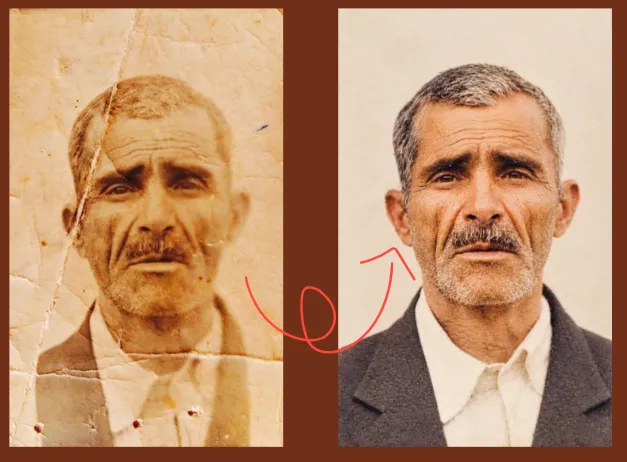
Professionally enhance this restored family photograph into a natural, high-resolution 4K-quality image using a careful, realistic, and authenticity-focused enhancement approach. Improve overall image clarity, sharpness, brightness, exposure, contrast, tonal balance, and visible fine details. Carefully enhance the existing photographic information without inventing new details or changing the original appearance. STRICT IDENTITY AND PRESERVATION: Maintain the exact identity, facial features, expressions, apparent age, hairstyle, hair texture, clothing, body proportions, pose, position, and appearance of every family member. Do not alter, beautify, reshape, replace, or regenerate faces. Do not add, remove, duplicate, merge, or rearrange any person. Preserve the original background, objects, surroundings, and composition. NATURAL PHOTOGRAPHIC QUALITY: Preserve realistic skin texture, natural facial details, original lighting, authentic shadows, and subtle photographic grain. Keep the original colors and tones natural. Reduce unwanted noise, fading, and minor image softness without removing genuine photographic texture. Avoid artificial facial reconstruction, invented facial details, excessive sharpening, harsh edges, plastic-looking skin, beauty filters, oversaturated colors, fake textures, unnatural lighting, HDR effects, and modern cinematic color grading. 4K UPSCALING: Carefully upscale the photograph to 4K-quality resolution while preserving its original aspect ratio, composition, and proportions. Improve the visibility of existing details without creating artificial details. Do not crop, stretch, rotate, distort, or change the framing. Keep every person and original element in its exact position. FINAL RESULT: The final image should look like the same original family photograph, naturally restored and carefully enhanced for high-resolution viewing. Maintain its authentic age, character, and photographic appearance. The result must look like a genuine photograph with improved clarity and resolution, NOT a newly generated, digitally recreated, or artificially beautified image. Preservation of the original photograph is more important than aggressive enhancement. If any detail is unclear or missing, retain its original appearance rather than inventing or reconstructing it.Prompt 15: Improve Resolution Without Changing the Photograph
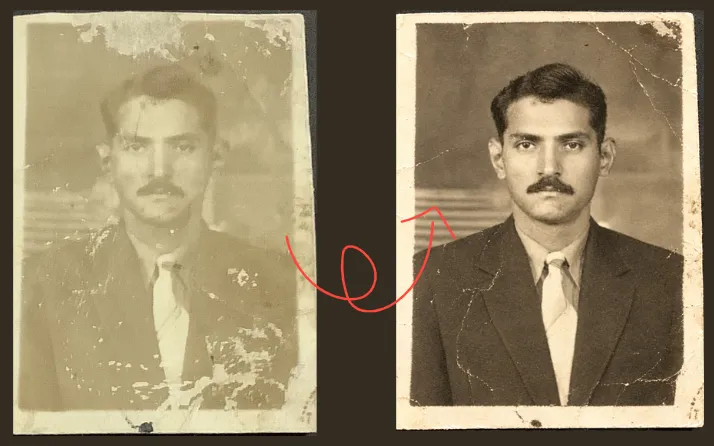
Professionally enhance and upscale this old family photograph into a high-resolution image using a careful, conservative, and authenticity-focused enhancement approach. Improve the visibility of existing photographic details, overall clarity, sharpness, exposure, contrast, and tonal balance. Reduce compression artifacts, digital noise, and minor image softness while preserving the original photograph's natural appearance. STRICT ORIGINAL CONTENT PRESERVATION: Maintain the exact original facial identities, facial features, expressions, apparent age, hairstyles, clothing, body proportions, poses, positions, and appearance of every person. Preserve all original people, objects, background elements, surroundings, lighting, shadows, and composition. Do not add, remove, replace, duplicate, rearrange, or reconstruct any person or object. FACE AND DETAIL ENHANCEMENT: Carefully improve the visibility of existing facial details, hair, clothing, and background using only information supported by the original photograph. Do not regenerate faces, invent missing facial features, change expressions, beautify skin, reshape facial structures, or remove natural imperfections. Preserve realistic skin texture, original photographic grain, natural edges, and authentic image characteristics. Avoid excessive sharpening, artificial textures, plastic-looking skin, oversmoothing, exaggerated contrast, oversaturated colors, HDR effects, and modern cinematic enhancement. HIGH-RESOLUTION UPSCALING: Increase the image resolution carefully while maintaining the original aspect ratio, proportions, framing, and composition. Improve pixel-level clarity and the visibility of existing details without introducing artificial information. Do not crop, stretch, rotate, distort, or change the original dimensions' proportions. FINAL RESULT: Produce a naturally enhanced, high-resolution version of the same original family photograph, suitable for viewing and printing. The photograph must retain its original identity, content, character, and authentic appearance. Prioritize faithful preservation over aggressive enhancement. If a detail is unclear, faded, or missing, retain its original appearance rather than inventing or reconstructing it. The final result should look like the original photograph with improved resolution and clarity, NOT a newly generated, digitally recreated, beautified, or modernized image.Prompt 16: Restore and Upscale a Very Low-Resolution Photo
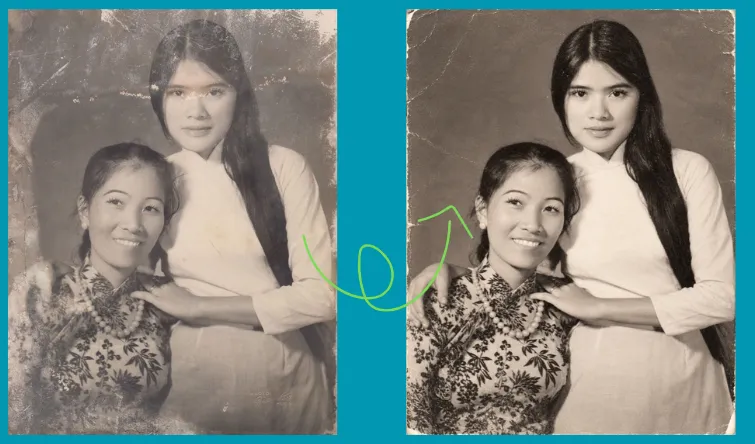
Carefully restore and upscale this low-resolution family photograph using a conservative, realistic, and authenticity-focused enhancement approach. IMAGE QUALITY ENHANCEMENT: Reduce visible pixelation, compression artifacts, digital noise, and image softness. Improve overall clarity, sharpness, exposure, contrast, and tonal balance. Carefully enhance the visibility of existing details in the faces, eyes, hair, clothing, and background without creating artificial information. IDENTITY AND CONTENT PRESERVATION: Preserve the exact original identity, facial features, expression, apparent age, hairstyle, hair texture, clothing, body proportions, pose, and position of every person. Keep all original people, objects, background elements, lighting, shadows, and composition unchanged. Do not add, remove, replace, duplicate, rearrange, or reconstruct any person or object. NATURAL FACE AND TEXTURE: Maintain realistic facial features, natural skin texture, original photographic grain, and authentic details. Do not invent missing facial information, regenerate faces, alter expressions, reshape facial structures, beautify skin, or remove natural imperfections. Avoid artificial skin smoothing, plastic-looking faces, excessive sharpening, harsh edges, oversaturated colors, exaggerated contrast, and unnatural photographic effects. CONSERVATIVE UPSCALING: Carefully increase the image resolution while improving the visibility of existing photographic details. Use natural sharpening and noise reduction without destroying genuine textures or introducing artificial patterns. Preserve the original aspect ratio, framing, composition, and proportions. Do not crop, stretch, rotate, distort, or change the photograph's original content. FINAL RESULT: Produce a clean, natural, high-resolution version of the same original family photograph, suitable for viewing and printing. The restored image should retain its original photographic character, natural appearance, and authentic family memories. Prioritize identity preservation and photographic accuracy over aggressive enhancement. If any detail is unclear, pixelated, or missing, preserve its original appearance rather than inventing, reconstructing, or guessing new information. The final result must look like the original photograph with improved clarity and resolution, NOT a newly generated, artificially reconstructed, or modernized image.Best Practices for Natural AI Photo Restoration
A good restoration prompt should describe what needs repair and what must remain unchanged.
You can write in your prompt: “Remove the visible scratches and dust along the upper edge, repair the faded area near the left corner, and improve contrast without changing the face.”
Also read
15 Best AI Photo Enhancement Prompts to Make Any Photo Look Professional (opens in a new tab)
Nowadays, if you do not know Photoshop editing or have zero skills in image editing, AI photo enhancement prompts can…
Also, ensure that you have added specific instructions to help the editor focus on the actual problem.
Next, always include an identity-preservation instruction when restoring a portrait.
Example: “Preserve the exact original facial identity and do not invent missing facial details.”
This does not guarantee that the AI will follow the instruction perfectly. Inspect the result carefully.
You also need to avoid excessive enhancement of your images.
Words such as cinematic, glamorous, flawless, beautiful, and perfect can encourage an image editor to change the photograph rather than restore it.
Also, avoid combining heavy damage repair, face enhancement, colorization, background replacement, and 4K upscaling into one request.
Try to keep the original scan and a separate restored version. This is especially important when the image has historical, family, or documentary value.
This can happen when the original face is blurry, damaged, or very small.
You can use a conservative restoration prompt and compare the face against the original.
If the image editor supports selecting an area, restore the damaged region rather than editing the entire photograph.
Excessive sharpening, skin smoothing, and generated texture can make an old photograph look like a modern digital portrait.
AI colorization cannot reliably know every original color from a black-and-white photograph.
Some image editors modify the background while improving the main subject.
Add a clear instruction to preserve the original background, objects, and composition. If necessary, select only the damaged area for editing.
An image-generating tool may enlarge an image without recovering accurate details.
So, check the actual output dimensions in your result images.
Also, remember that resolution and visual quality are different: a larger file can still contain blur, artifacts, or invented details.
FAQs
How do I make an old photo look 4K?
First restore the photograph, then use an image upscaler to increase its dimensions. Preserve the original aspect ratio and review the enlarged image for artificial details, especially around faces, hair, and clothing. A 4K output does not guarantee genuine 4K-level source detail.
Can AI restore a severely damaged photograph?
AI can repair some scratches, tears, stains, and missing areas by generating plausible content based on surrounding details. It cannot reliably recover information that is completely absent. Treat reconstructed areas as estimates rather than exact recovery.
Can I colorize black-and-white family photographs with AI?
Yes. AI image editors can add plausible colors to black-and-white photographs. However, the original colors are usually unknown unless you have another reference. Use natural, restrained colors and preserve the original composition and identity.
How can I restore a blurry old family photograph?
You can use a prompt that asks the editor to reduce blur, noise, and haze while preserving the original face, expression, clothing, and background. Avoid aggressive sharpening. If the face is very small, a carefully selected crop may help, but AI-generated details should still be checked against the original.
Can AI restore old photos without changing faces?
AI can often improve clarity and repair damage while retaining recognizable facial features, but it cannot guarantee exact identity preservation. Blurry or missing facial details may be reconstructed inaccurately. Compare the restored image with the original and reject versions that change important features.
What is the best prompt to restore old family photos in 4K?
The best prompt specifies the visible damage, asks for natural restoration, and protects the original person’s identity. It should preserve facial features, expressions, apparent age, clothing, pose, background, and composition while improving clarity and resolution. Avoid asking the AI to beautify or modernize the photograph.
Conclusion
Restoring old family photographs with AI can help preserve meaningful memories and make damaged images easier to view, share, and print.
The most effective Prompts to Restore Old Family Photos in 4K focus on specific damage, natural enhancement, and strict identity preservation. Start with a conservative restoration, correct the colors if needed, and upscale only after reviewing the result.

Also read
How to Create a Dhanteras Wish Video with Your Own Photo and Name Using AI (opens in a new tab)
Today, in this article, we will see how you can create a Dhanteras status video using your own image and…
Remember that AI restoration is an enhancement process, not a perfect recovery of lost information.
Keep the original photograph safe, compare every edit, and choose the version that preserves the people and details that make the memory meaningful.
A carefully restored photograph should look clearer while still feeling like the same photograph your family has kept for years.