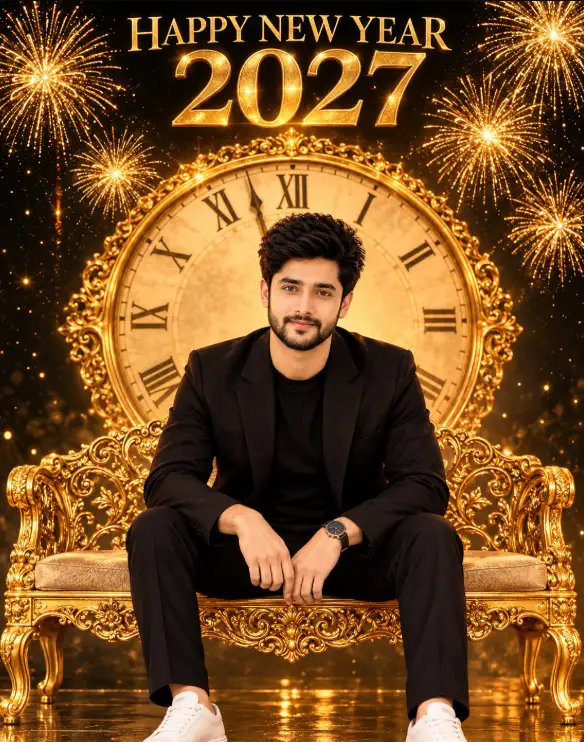
New Year 2027 AI Photo Prompt
By photoeditprompts.in · Updated November 26, 2026
Prompt
0
Create an ultra-realistic, luxurious New Year 2027 celebration poster using the uploaded photo as the face reference. Preserve the person's facial identity, natural facial features, hairstyle, and realistic appearance. COMPOSITION & POSE:
A young man is sitting confidently on an ornate antique golden bench in the center of the frame. He is facing the camera with a calm, relaxed expression. His legs are slightly apart, both feet resting naturally forward, one hand relaxed between his legs and the other resting on his thigh. Recreate the same seated posture, body positioning, camera angle, and proportions as the reference image. OUTFIT:
He is wearing a completely black outfit consisting of a black blazer, black round-neck shirt, black fitted trousers, and clean white sneakers. The outfit is elegant, minimal, modern, and stylish. Keep the black clothing realistic with subtle fabric textures and natural folds. GOLDEN CLOCK BACKGROUND:
Behind him is a gigantic, beautifully detailed antique golden clock with Roman numerals, ornate engraved patterns, decorative gold edges, and a glowing circular frame. The clock is positioned directly behind the subject, creating a dramatic halo-like effect. The clock face is warm ivory gold with dark Roman numerals and elegant clock hands approaching midnight. BENCH:
The man is seated on an elaborate golden antique bench with intricate baroque carvings, decorative floral patterns, curved legs, and a polished metallic gold finish. The bench extends horizontally across the composition and has rich ornamental details. NEW YEAR TEXT:
At the top of the image, display the exact text: “HAPPY NEW YEAR” Directly below it, in very large bold elegant golden typography, display: “2027” Use premium serif lettering with a metallic gold texture, soft golden glow, subtle beveling, and elegant highlights. Make the text perfectly readable and centered. FIREWORKS:
Create spectacular golden fireworks bursting across the upper left and upper right corners of the background. Add glowing sparks, tiny golden particles, floating embers, and subtle light trails around the clock. Fireworks should frame the headline without obscuring the text. ENVIRONMENT:
A dark black cinematic background filled with tiny golden stars, glowing dust, floating embers, and subtle atmospheric haze. The scene should feel festive, magical, premium, and elegant. Add a warm golden light emanating from the clock behind the seated person, creating beautiful separation from the dark background. LIGHTING & COLOR GRADING:
Use dramatic cinematic lighting with a rich black and antique-gold color palette. Warm golden rim lighting outlines the subject, bench, and clock. The face should be naturally illuminated with soft warm light. Deep blacks, bright gold highlights, subtle shadows, realistic metallic reflections, glowing particles, and high contrast. Avoid excessive brightness and oversaturated colors. STYLE:
Luxury New Year celebration poster, photorealistic portrait photography, 3D golden clock, ornate royal furniture, dramatic fireworks, golden particle effects, premium cinematic composition, ultra-detailed metallic textures, professional DSLR quality, 4K resolution, realistic depth, festive atmosphere. FORMAT:
Vertical 4:5 poster composition, high resolution, suitable for Instagram, Facebook, and New Year greetings. Keep the person in the center, the clock behind him, the golden bench below him, and “HAPPY NEW YEAR 2027” at the top. Do not add extra text, logos, watermarks, or unnecessary objects.
Hashtags
- Occasion
- CinematicSocial Media
- Aspect ratio
- 1:1 (1024×1024)1200×10001200×6281920×1080 (16:9)4:5 (1080×1350)9:16 (1080×1920)
- Quality
- 1080p4K8K
- Prompt type
- Direct prompt
You may also read
More articles →- AI Cineatic 8K Video Prompt
Girlfriend happy birthday video editing
- AI Cineatic 8K Video Prompt
Image to 4k Video Converter Prompt Free
- AI Mobile Wallpapers Free
5 Realistic Men’s Winter Image Prompts for ChatGPT (Free & Easy)
- Action Picture Generate Prompts
7 Ultimate Tips for Creating the Perfect New Photo Image Prompt for Men
How to use this prompt
- Press Copy prompt to copy the full prompt.
- Open ChatGPT and start a new image.
- Paste the prompt and set the aspect ratio to 1:1 (1024×1024).
- Generate, then adjust a few words to make it your own.
More prompts like this
AI Age Progression Photo Prompt (opens in a new tab)
photoeditprompts.in
Prompt for ultra-realistic premium cinematic photo collage poster (opens in a new tab)
photoeditprompts.in
Discipline Motivational Poster Prompt for Gemini AI (opens in a new tab)
photoeditprompts.in
Christmas Snow Globe AI Prompt with Name | Gemini Christmas Portrait (opens in a new tab)
photoeditprompts.in
GTA 6 Style Cafe Poster Prompt one click download (opens in a new tab)
photoeditprompts.in
Cinematic 4K Smoke Name Portrait Prompt for Gemini AI (opens in a new tab)
photoeditprompts.in
Manga Comic Action Portrait Prompt for Gemini AI (opens in a new tab)
photoeditprompts.in
AI Bridal Portrait Collage Prompt for Gemini (opens in a new tab)
photoeditprompts.in