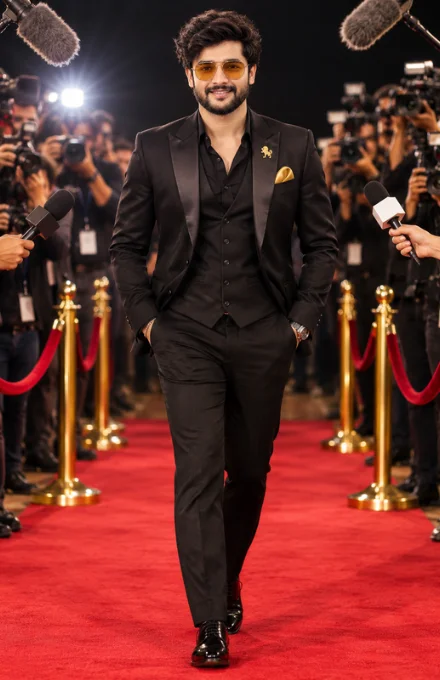
Cinematic 4K Red Carpet Fashion AI Photo Editing Prompt
By photoeditprompts.in · Updated November 7, 2026
Prompt
0
Create an exceptionally photorealistic, high-end cinematic red-carpet fashion photograph featuring an adult man, using the uploaded reference image as the exact visual reference. 1. SUBJECT & APPEARANCE A stylish, confident and handsome adult man with naturally textured, slightly tousled dark-brown hair, subtle facial stubble, a well-defined jawline and a calm, confident expression. He wears elegant amber-tinted aviator sunglasses. His facial appearance, hairstyle, facial proportions and natural expression should remain consistent with the supplied face reference, if provided. 2. EXACT WALKING POSE – DO NOT CHANGE Reproduce the exact walking pose from the reference photograph. The man walks confidently towards the camera along the centre of a luxurious red carpet. His body faces forward, shoulders relaxed and head slightly raised, with his gaze directed confidently towards the camera. – Both hands remain inside the front pockets of his trousers.
– Both elbows are naturally angled outward.
– One leg crosses slightly in front of the other during the walking stride.
– One polished black shoe is positioned forward while the opposite foot remains behind.
– Maintain the same natural walking posture, leg positioning, body balance and confident attitude. Do not change the walking direction, hand placement, head angle or body orientation. 3. EXACT OUTFIT & ACCESSORIES A luxurious, perfectly tailored all-black three-piece formal suit consisting of: – Premium black tailored blazer with elegant satin peak lapels.
– Matching fitted black waistcoat with front buttons.
– Black formal dress shirt with the upper buttons casually open.
– Matching slim-tailored black trousers.
– Glossy black formal leather Oxford shoes.
– Elegant gold pocket square.
– Small gold lion-style lapel pin.
– Premium wristwatch and subtle bracelet.
– Amber-tinted aviator sunglasses. Preserve the same sophisticated black-and-gold styling, fabric appearance, tailoring and overall luxury aesthetic. 4. RED CARPET ENVIRONMENT & CROWD Recreate the same glamorous international movie-premiere red-carpet environment. The man walks along a rich, deep-red carpet surrounded by golden polished velvet-rope stanchions with luxurious red velvet ropes on both sides. A large crowd of photographers, journalists and media professionals surrounds the carpet, capturing photographs with professional DSLR cameras and video equipment. Multiple microphones are extended towards the man from both sides, including press and television microphones. Professional camera operators, photographers, flashes and recording equipment create an authentic celebrity media atmosphere. Large furry boom microphones are visible near the upper-left and upper-right edges of the frame. Maintain the same crowd density, photographer placement, camera arrangement, microphone positions and red-carpet perspective as the reference. 5. LIGHTING & ATMOSPHERE Professional cinematic event photography lighting. A bright camera flash illuminates the background on the left side, creating a beautiful photographic highlight. Soft frontal illumination keeps the man's face, sunglasses and black suit clearly visible. Use dramatic yet natural highlights on the suit, realistic shadows, subtle reflections on the polished shoes and golden barriers, and a deep black background. 6. CAMERA & COMPOSITION Professional full-frame DSLR photography, Sony A1 aesthetic, 85mm portrait lens, f/2.8 aperture. Eye-level to slightly low camera perspective, centred full-body composition. The subject must remain completely visible from head to shoes, with the red carpet extending into the foreground. Photographers and microphones frame both sides of the image. Vertical 2:3 composition. 7. CINEMATIC COLOUR GRADING & IMAGE QUALITY Preserve the reference's sophisticated cinematic colour grading: – Deep black tones.
– Rich red carpet.
– Warm golden highlights.
– Natural skin tones.
– Dramatic dark background.
– Realistic reflections and contrast. Ultra-photorealistic 4K detail, crystal-clear facial features, realistic skin texture, individual hair strands, detailed suit fabric, sharp accessories and polished leather shoes. Premium Hollywood red-carpet editorial photography with professional DSLR clarity. 8. STRICT REFERENCE PRESERVATION The final image must closely match the uploaded reference in: – Exact walking pose and crossed-leg stride.
– Both hands inside trouser pockets.
– Same black three-piece suit and gold accessories.
– Same sunglasses and hairstyle.
– Same confident facial expression.
– Same crowd density and photographer arrangement.
– Same microphones and boom microphones.
– Same red carpet and golden velvet barriers.
– Same camera perspective and full-body framing.
– Same lighting, atmosphere and colour grading. NEGATIVE PROMPT: No pose changes, no standing still, no sitting, no running, no different walking style, no hands outside pockets, no altered leg positioning, no different suit colour, no missing waistcoat, no missing sunglasses, no empty background, no different crowd arrangement, no missing photographers, no distorted hands, no extra fingers, no extra limbs, no cropped shoes, no blurry face, no artificial skin, no cartoon appearance, no excessive retouching, no text, no watermark, no logos. FINAL OUTPUT: Ultra-realistic cinematic 4K full-body red-carpet celebrity fashion photograph, faithfully matching the original reference composition, pose, outfit, environment and visual atmosphere. –ar 2:3
Hashtags
- Occasion
- CinematicSocial Media
- Aspect ratio
- 1:1 (1024×1024)1200×10001200×6284:5 (1080×1350)9:16 (1080×1920)
- Quality
- 1080p4K8K
- Prompt type
- Direct prompt
You may also read
More articles →- AI Photo Edit
15 Best AI Photo Enhancement Prompts to Make Any Photo Look Professional
- AI Cineatic 8K Video Prompt
How to Create a Dhanteras Wish Video with Your Own Photo and Name Using AI
- AI Cineatic 8K Video Prompt
Wedding Cinematic 8K Video Prompt
- AI Mobile Wallpapers Free
7 Happy dhanteras greetings with name
How to use this prompt
- Press Copy prompt to copy the full prompt.
- Open ChatGPT and start a new image.
- Paste the prompt and set the aspect ratio to 1:1 (1024×1024).
- Generate, then adjust a few words to make it your own.
More prompts like this
Cinematic Fire Explosion Man Portrait AI Photo Editing Prompt – 8K Realistic Action Poster (opens in a new tab)
photoeditprompts.in
Glowing Holographic Earth AI Portrait Prompt (opens in a new tab)
photoeditprompts.in
Ultra-Realistic Professional Corporate Headshot AI Photo Editing Prompt (opens in a new tab)
photoeditprompts.in
Woman outdoor cinematic photograph prompt (opens in a new tab)
photoeditprompts.in
Create Your Own Miniature Mahindra Thar Lover Bobblehead Prompt (opens in a new tab)
photoeditprompts.in
Luxury Coastal Fashion AI Prompt (opens in a new tab)
photoeditprompts.in
Ultra-Cinematic Black & White Portrait AI Prompt (opens in a new tab)
photoeditprompts.in
Cinematic 4K AI Studio Portrait Prompt – Elegant Black Outfit (opens in a new tab)
photoeditprompts.in