- Action
- Advertisement
- Attitude
- Cinematic
- Social Media
- ChatGPT
- Gemini
- Google Flow Ai
- Ideogram
- Kling
- Leonardo
- Midjourney
- Nano Banana
- Sora
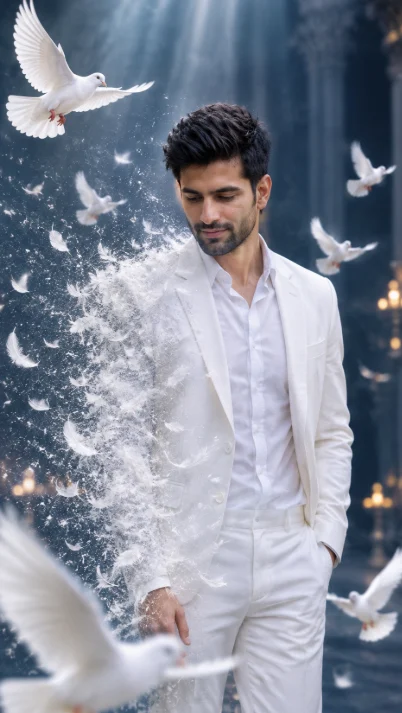
Cinematic 4K Portrait White Outfit Dove AI Photo Prompt
By photoeditprompts.in · Updated November 23, 2026
Prompt
0
Use the uploaded reference image as the exact composition and scene reference. Create an ultra-realistic cinematic 4K photograph. Do not reinterpret it as a close-up portrait or redesign the scene. COMPOSITION & FRAMING (MOST IMPORTANT): Reproduce the exact framing of the reference image. Show the man from head down to approximately his knees/upper legs, with his body positioned slightly to the right of center. His body is turned slightly sideways, his head tilted down, and his gaze directed downward. Keep sufficient space around him for the flying birds and feather particles. Do not zoom in. Do not crop to the face, shoulders, or chest. Preserve the original camera distance and vertical composition. POSE & EXPRESSION: Maintain the same standing posture, body angle, slightly lowered head, downward gaze, relaxed shoulders, and calm, gentle facial expression as the reference. His face must not be looking directly at the camera. FACE & IDENTITY: Use the uploaded person's exact facial identity. Preserve face shape, eyes, nose, lips, hairstyle, skin tone, and natural facial details. Do not beautify or redesign the face. CLOTHING: The man is wearing the same white formal outfit with a white jacket over a white shirt. Keep the jacket, shirt, fabric texture, folds, fit, and appearance exactly as shown in the reference. DOVE PLACEMENT & PARTICLE EFFECT: Recreate the birds in the same positions and scale as the reference image. A large white dove flies in the upper-left corner, smaller doves appear around the left side and behind the man, and several birds fly on the right and across the lower foreground. One large blurred dove occupies the bottom-left foreground, partially covering the frame. White feathers, tiny glowing particles, and a magical dissolving effect spread from the man's left side and torso toward the left side of the image. His body should appear partially dissolving into feathers and fine particles, exactly as in the original composition. Do not arrange the birds symmetrically or place them all near his face. BACKGROUND: A dark blue-gray, grand architectural interior with tall vertical structures, soft shafts of light from above, atmospheric haze, distant warm lights, and a deep blurred background. Maintain the same background layout, darkness, depth, and visual atmosphere as the reference. LIGHTING & COLOR: Cool blue-gray cinematic lighting, soft overhead light rays, subtle highlights on the white outfit, natural skin tones, gentle shadows, slightly desaturated colors, and the same dramatic contrast as the reference. Do not brighten the entire image or turn it into a clean studio portrait. CAMERA: Vertical 9:16 composition, cinematic full-frame DSLR photography, medium-long shot, camera positioned at the same distance as the reference, natural perspective, realistic depth of field, sharp face, detailed suit texture, soft motion blur on foreground doves, photorealistic 4K. STRICT REFERENCE RULE: The reference image controls the framing, body size, pose, head angle, bird locations, particle-dissolve effect, background, lighting, and colors. Do not create a new composition. Do not zoom in. Do not convert to a headshot. Do not simplify the scene. Negative instructions: close-up portrait, headshot, chest-up crop, zoomed face, looking at camera, standing straight, symmetrical bird arrangement, birds clustered around the head, plain studio background, clean blue background, missing particle effect, missing feathers, bright white background, altered outfit, changed pose, altered camera angle, cartoon, illustration, plastic skin, text, watermark.
Hashtags
- Aspect ratio
- 1:1 (1024×1024)1200×10001200×6281920×1080 (16:9)4:5 (1080×1350)9:16 (1080×1920)
- Quality
- 1080p4K8K
- Prompt type
- Direct prompt
You may also read
More articles →- AI Cineatic 8K Video Prompt
Girlfriend happy birthday video editing
- AI Cineatic 8K Video Prompt
Image to 4k Video Converter Prompt Free
- AI Mobile Wallpapers Free
5 Realistic Men’s Winter Image Prompts for ChatGPT (Free & Easy)
- Action Picture Generate Prompts
7 Ultimate Tips for Creating the Perfect New Photo Image Prompt for Men
How to use this prompt
- Press Copy prompt to copy the full prompt.
- Open ChatGPT and start a new image.
- Paste the prompt and set the aspect ratio to 1:1 (1024×1024).
- Generate, then adjust a few words to make it your own.
More prompts like this
Same Close-Up Couple Portrait AI Prompt in 4K (opens in a new tab)
photoeditprompts.in
Rainy Road Girl AI Photo Prompt (opens in a new tab)
photoeditprompts.in
Kids Portrait Collage AI Prompt (opens in a new tab)
photoeditprompts.in
Golden Halo 4K DSLR Beige Suit AI Photo Prompt (opens in a new tab)
photoeditprompts.in
Brown Leather Jacket AI Prompt | Same Pose & Face 4K Prompt (opens in a new tab)
photoeditprompts.in
4K Romantic Couple 3 Pose AI Prompt (opens in a new tab)
photoeditprompts.in
Cute Boy AI Garden Portrait Prompt (opens in a new tab)
photoeditprompts.in
2026 New Year Futuristic Clock AI Photo Prompt (opens in a new tab)
photoeditprompts.in