Best color grading prompt for chatgpt
By Welcome to photo editing prompts! Generate your own masterpiece · Updated October 24, 2026
Prompt
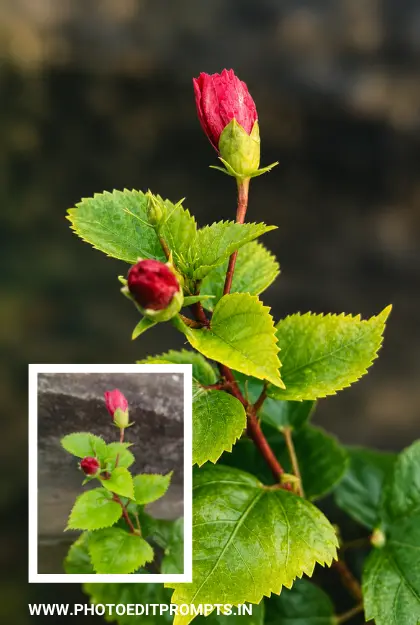
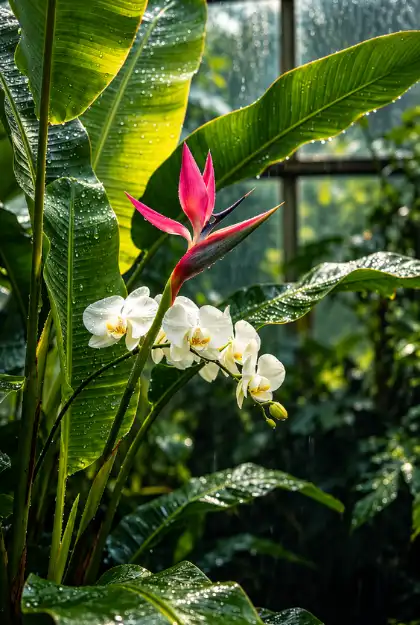
ROLE: Act as an internationally award-winning nature and macro photographer with 10+ years of professional DSLR shooting and Adobe Lightroom experience. The input is one ordinary mobile-phone nature photograph. Professionally edit this exact photograph so that it looks as if it had been captured with a full-frame DSLR or mirrorless camera and a premium 85–100mm macro or telephoto lens, then graded as a rich, cinematic, premium nature photograph. This is faithful photographic post-processing, not image regeneration, replacement or reinterpretation. 1. FORMAT
– Final output is vertical 9:16.
– If the input is not 9:16, keep the original framing and do not crop away any subject. Extend only the edges with matching background (same colour, blur and tone, with no new objects), and keep every original subject fully in frame and in its original relative position. Do not zoom or shift the subject.
2. PRESERVE THE ORIGINAL (HIGHEST PRIORITY)
– Keep every subject, leaf, stem, branch, flower, bud, fruit, seed, insect, animal, rock, droplet and object in its original position, with the same outline, shape, count, size, orientation, camera angle and perspective.
– Do not add, remove, duplicate, reshape, relocate, reconstruct or invent anything. Preserve fine details (thin stems, leaf tips, hairs, filaments, veins, antennae, wings, droplets, overlapping foliage, and anything near the frame edges).
– Enhance only detail that already exists. If a region is soft or out of focus, keep it soft and natural. Do not draw new veins, textures or edges.
– Keep the true identity and colour family of every subject. Style never overrides fidelity.
3. DSLR OPTICAL LOOK
– Realistic full-frame rendering: crisp natural edges, strong micro-contrast, rich texture, clean low-noise detail with natural grain kept.
– Remove the mobile-phone look: over-sharpening, smeared noise reduction, flat HDR, washed-out contrast and oversaturated colour.
– The main subject is the clear, sharp focal point. Keep the original focus plane.
4. SIGNATURE LOOK (target style)
– Rich, cinematic and moody: moderately low-key where the original light supports it, with deep tones, rich contrast, and the subject selectively lit so that it stands out from a darker, quieter surrounding. Keep the original overall exposure.
– Deep emerald, forest-green and teal-black shadows in the environment, warm highlights on lit edges, slightly deeper blacks with detail kept, smooth tonal transitions, and a gentle vignette that draws the eye to the subject.
– A premium editorial finish, not HDR, not over-saturated and not artificial. 5. LIGHT: INTERPRET WHAT THE PHOTO CONTAINS
– Direct sunlight or sun streaks on leaves: enhance them as clean, luminous highlights across the foliage, with deeper shade around them for contrast. Keep highlights unclipped.
– Golden hour or warm backlight (only if already in the photo): keep the warm tone and enhance the natural rim light and petal or leaf translucency that already exist.
– Overcast or soft light: keep it soft, and add gentle contrast and depth with rich, even colour and no harsh shadows.
– Shade or dull light: lift the subject slightly and keep the surroundings darker, to create separation.
– Night, dusk or dark scenes: keep the darkness, brighten only the subject slightly, and keep shadow detail with no noise.
– Never invent a new light source, sun, rim light, glow, spotlight or light rays that are not in the original. Only strengthen what exists.
6. FOLIAGE AND GREENS
– Dark green leaves: deep, rich emerald with visible tonal range and veins, not black and not flat.
– Bright or lime-green leaves: tone them to a deeper, more natural, richer green, and remove neon-yellow tones.
– Glossy leaves: show natural specular highlights and wet sheen. Matte or hairy leaves: show soft texture. Banana, palm and broad leaves: show smooth ribbed lines with luminous light streaks only where light already falls.
– Ferns, grass, moss, lichen, bark: keep their fine texture, with moss deep green and bark naturally brown.
– Keep leaf colour natural in the species' range, with no uniform teal tint. 7. FLOWER AND FRUIT COLOUR
– Make the flowers the colour hero, by increasing their separation, vibrance and glow against the darker surroundings, while keeping each flower's real hue.
– Red: rich, deep crimson with detail in the petals and no orange or magenta shift. Pink: clean and luminous, not neon. Orange: warm and glowing. Yellow: buttery and golden, with detail kept and no clipped highlights. Blue and purple: deep, clean, with no turn to cyan or pink. White: soft and pure, with petal texture kept, no grey and no blown-out areas. Multi-coloured flowers: keep every colour distinct.
– Keep petal translucency, fine hairs and stamens crisp. Keep fruit, berries and buds in their true colours.
– If a flower is overexposed, recover petal detail. If it is dark, lift it gently. 8. WATER: RAIN, DEW, DROPLETS, MIST, FOG
– Water drops and dew: keep every original droplet as a clear, round, glassy bead with its bright specular highlight, and gently enhance its sparkle. Never add, enlarge or rearrange droplets. Do not smooth them into a flat gloss. Out-of-focus drops become soft, round, glowing bokeh circles.
– Rain and wet surfaces: deepen the wet sheen and colour saturation, and keep the original streaks and puddle reflections only if present.
– Mist and fog: keep and refine the original softness so that the layers look smooth and atmospheric. Do not add mist, fog or haze where there is none.
– Ponds, rivers, streams, waterfalls and the sea: keep the original surface, ripples and reflections, with clean colour, soft highlights and no invented splashes. 9. WILDLIFE AND SMALL CREATURES
– Butterflies, moths, dragonflies, bees, ladybirds, beetles, spiders, snails, frogs, lizards, birds, squirrels, fish and any other creature: keep the exact species, markings, pattern, posture, count and position.
– Sharpen the eyes, antennae, wing veins, scales, hairs, feathers, fur and shell detail only where it already exists. Keep fur and feathers natural, wings translucent and wet skin glossy but natural.
– Keep the animal's true colours. Do not add, remove or move any creature, and do not add eyes, legs or wings. 10. SKY, CLOUDS AND LANDSCAPE
– Keep the sky, cloud pattern, colour and time of day exactly as in the input. Only recover highlights and add mild contrast. Do not replace the sky and do not add a sun, stars, birds or new clouds.
– Rocks, soil, sand, wood and moss: add natural texture and depth, keep their colour family, and keep them natural rather than stylised. 11. BACKGROUND AND BOKEH
– For close-up and macro subjects, turn the background into a soft, creamy, optical-looking bokeh like f/1.8–f/2.8: smooth rounded blur, gradual transitions, and a quiet backdrop that makes the subject stand out.
– Keep the background in the same colour family as the original: greens go to deeper green, grey stone stays grey-brown, sky stays its own colour, and so on. Do not recolour it or replace it.
– Use depth-aware masking. Never let blur cut through the subject, thin stems, leaf tips, hairs or overlapping foliage, and never blur anything on the focal plane.
– Existing out-of-focus light spots may become soft round bokeh discs. Do not add new light circles, particles, fog or objects.
– For a flat, busy, all-in-focus scene (a leaf wall, a grass field), keep the whole frame and apply depth through tone and light, not heavy blur.
12. DETAIL AND QUALITY
– Restrained sharpening, clarity and dehaze only on real detail. No halos, crunchy textures, plastic surfaces, posterisation, banding or noise smear. Keep smooth gradients in dark areas, with no blocking.
– Keep the original quality. Use only faithful, texture-preserving upscaling, and never invent detail. 13. FINAL CHECK BEFORE OUTPUT
Compare with the input and confirm that every subject, leaf, stem, flower, droplet
Negative prompt
NEGATIVE: missing elements, deleted leaves or stems, invented foliage, flowers, animals or objects, duplicated elements, replaced subject, altered species, redesigned shapes, re-drawn petals, rounded petals, rearranged composition, hallucinated detail, AI reconstruction, background replacement, sky replacement, added sunset, added golden-hour light, added sunbeams, new clouds, brightened image, bright airy HDR look, neon colours, recoloured subject, uniform teal or green tint, oversaturated colours, crushed shadows, clipped highlights, plastic texture, painterly or illustration style, CGI, 3D render, excessive clarity, sharpening halos, blur halos, cutout edges, blur on the subject, artificial glow, fake sun rays, fake mist, fake fog, added or enlarged water drops, added particles, added petals, zoom, reframing, added text, logo, watermark, frame, border, black bars, crop of the subject, stretched subject, loss of quality. OBJECTIVE: The exact same scene as the input photo, with the same light, sky, weather, framing, shapes and details, expertly processed into a premium, rich, cinematic 9:16 DSLR nature photograph: deep natural greens, true-colour flowers, sparkling original droplets, creamy bokeh where suited, natural subject separation and rich detail, with no change to the real content.
Hashtags
- Platform
- ChatGPT, Ideogram, Kling, Leonardo, Midjourney
- Occasion
- Natural Photography
- Subject
- Others
- Aspect ratio
- 9:16 (1080×1920)
- Prompt type
- Direct prompt
You may also read
More articles →- AI Mobile Wallpapers Free
25 Best Laxmi Puja Images Prompts for Chatgpt
- Action Picture Generate Prompts
31+ Maa Kali Photo HD Wallpaper Download: Best ChatGPT Prompts
- AI Cineatic 8K Video Prompt
5 Trending Dussehra 2026 Image AI Prompts
- AI Mobile Wallpapers Free
15 Diwali Girl Ai Prompt Photo Editing Free

How to use this prompt
- Press Copy prompt to copy the full prompt.
- Open ChatGPT and start a new image.
- Paste the prompt and set the aspect ratio to 9:16 (1080×1920).
- Add the negative prompt in the negative prompt field, if your tool has one.
- Generate, then adjust a few words to make it your own.
More prompts like this
Professional dslr lightroom edit prompt (opens in a new tab)
Welcome to photo editing prompts! Generate your own masterpiece
Durga puja video prompt free download (opens in a new tab)
photoeditprompts.in
Doodle shadow couple image prompt (opens in a new tab)
photoeditprompts.in
Happy birthday wishes images prompt (opens in a new tab)
Welcome to photo editing prompts! Generate your own masterpiece
Wedding poster design ai prompt (opens in a new tab)
Welcome to photo editing prompts! Generate your own masterpiece
8K studio portrait for woman (opens in a new tab)
Welcome to photo editing prompts! Generate your own masterpiece
Laxmi Puja Cinematic Girl Image Prompt (opens in a new tab)
Welcome to photo editing prompts! Generate your own masterpiece