Restore Your Dad’s Old Smile from Any Faded Photo in Seconds Using Google Gemini AI Prompts
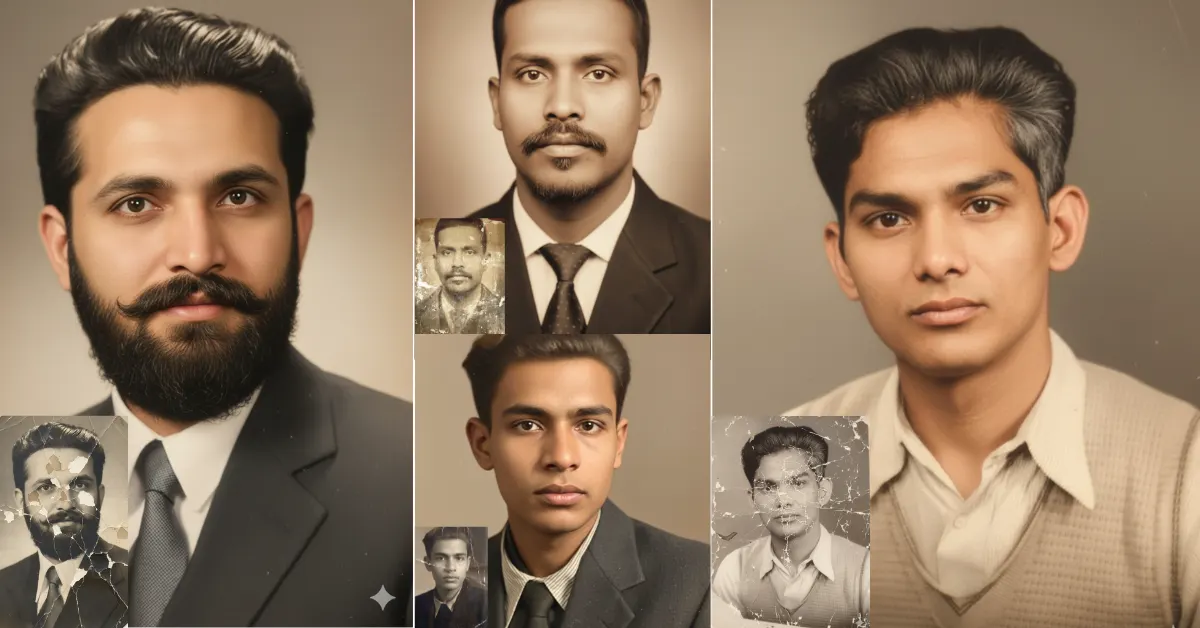
Gemini AI Prompts Dad’s Old Smile from Any Faded Photo: Family memories are priceless, even when they fade or blur in old photo albums.
Especially when your father’s photos touch your heart and you can’t find the right way to restore them.
Gemini AI Prompts have revolutionized photo restoration.
Today, in this blog, I reveal the techniques for bringing back Dad’s old smile from any faded photo in just seconds.
Just imagine giving priceless memories new life with a single tap —
and all credit goes to the advanced Nano Banana Gemini image model and 2.5-Flash editing features.
Let’s discover the easy copy-paste process for restoring your father’s or any family member’s cherished photo.
Download The Gemini AI Prompts for Dad’s Old Faded Photos Restorations
Your dad’s old smile deserves to live forever — not fade away with time.
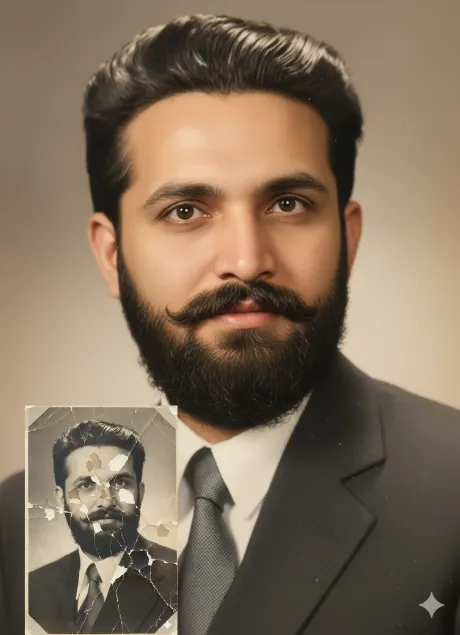
Imagine opening your childhood album and realizing your dad’s laughter — once so bright — now barely shows through faded, cracked paper.
Prompt 1
Restore this photo, correcting uneven discoloration, faded patches, and mottled texture caused by water damage. Remove all scratches and abrasions, especially from the face and background. Enhance details and clarity to achieve a photorealistic, sharp, and vivid color 8K ultra DSLR quality image with natural colors and lighting.
What if you could bring that very smile back to life — clear, colorful, and real — in less than 10 seconds?
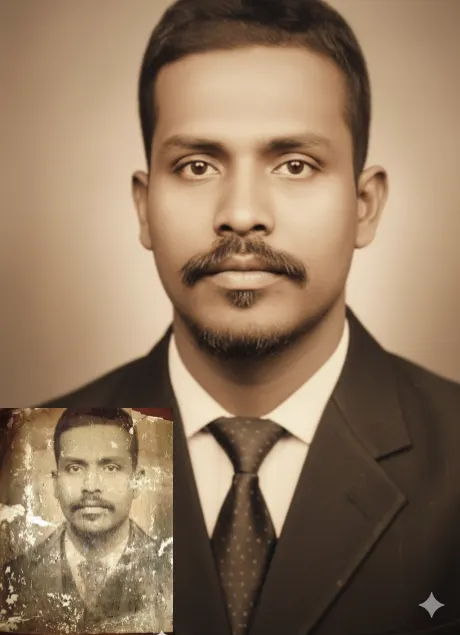
That’s exactly what happened when one user uploaded a decades-old black-and-white photo to Google Gemini.
Prompt 2
Restore this damaged old photograph, addressing surface scratches, abrasions, and scuffs. Repair emulsion cracking and peeling, water damage, and fading due to chemical degradation. Fix all tears and edge deterioration, and remove paper discoloration and staining. Colorize the entire image with realistic, natural colors, and upscale it to an 8K resolution, ensuring a photorealistic finish.
Within moments, Gemini AI Prompts restored every fine wrinkle, warmth, and emotion hidden beneath time.
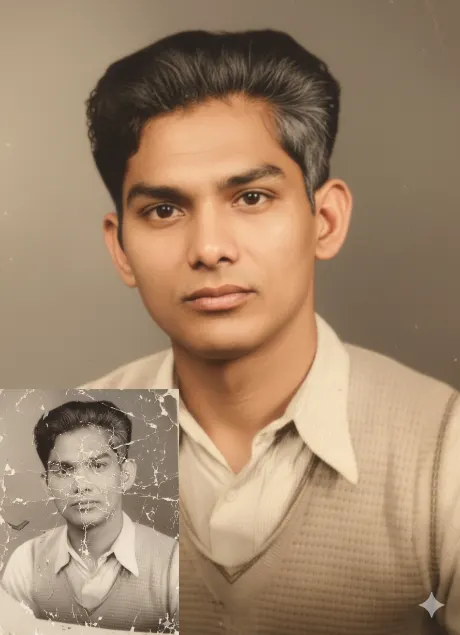
Prompt 3
Restore this damaged old photograph: repair all surface scratches, abrasions, scuffs, emulsion cracking, peeling, and water damage. Fix all tears, creases, and edge deterioration. Remove paper discoloration, staining, and fading due to chemical degradation or oxidation. Colorize the entire image with realistic, natural, and vibrant colors. Upscale the image to an ultra 8K resolution, ensuring a photorealistic finish as if captured with a modern DSLR camera.
It’s not just tech — it’s emotional rescue for every family.
How to Use Gemini AI Dad’s Old Smile from Any Faded Photo
Have you ever wondered how seamless and instant the recovery of family memories can be in this era of AI?
About three months ago, my father handed me a photo from his youth — damaged, colorless, fading into history.
I uploaded it, selected Gemini AI photo restoration prompts, and within seconds, watched his smile reappear.
Gemini AI’s Revolutionary Photo Restoration will make your father’s memories shine again with just a few clicks.
You can follow these steps to restore your dad’s photo:
- Open the website of Gemini AI.
- Copy the prompt from photoeditprompts.in in a new tab.
- Go back to the Gemini website and log in with your Gmail ID.
- In the prompt area, paste the prompt and click the “+” icon.
- Select your old father’s photo and upload it.
- Click the “Run” button and wait for a few seconds.
Just watch Gemini AI restore your father’s priceless memories instantly and flawlessly.
Furthermore, this method doesn’t just repair — it enhances.
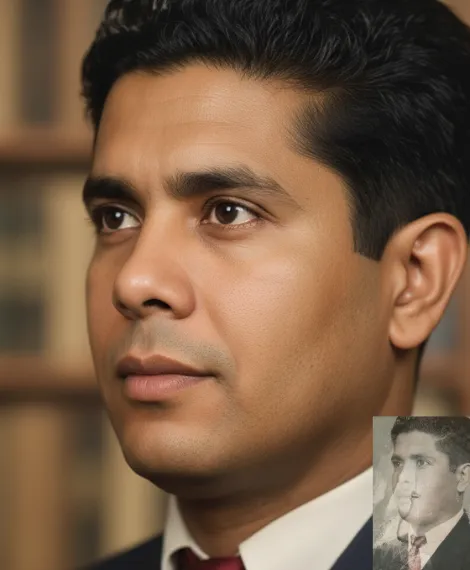
What’s more, it can also colorize black-and-white photos, balance lighting, and remove noise automatically.
Prompt 4
ultra-realistic, 8K, cinematic lighting, volumetric light, shallow depth of field, color grading, high contrast, glossy finish, smooth bokeh, traditional, devotional highly detailed cinematic image from this image by estore this damaged old photograph: repair all surface scratches, abrasions, scuffs, emulsion cracking, peeling, and water damage. Fix all tears, creases, and edge deterioration. Remove paper discoloration, staining, and fading due to chemical degradation or oxidation. Colorize the entire image with realistic, natural, and vibrant colors. Upscale the image to an ultra 8K resolution, ensuring a photorealistic finish as if captured with a modern DSLR camera.
In the same way, you can even use Gemini AI prompts for son or daughter’s images — turning simple snapshots into ultra-realistic DSLR portraits in moments.
Why Use Gemini AI for Father Photo Editing?
AI can now bring lost smiles back from the past — and Gemini is leading the revolution.
According to Google’s imaging benchmarks, Gemini’s accuracy crosses 97% in restoring facial features from damaged or faded portraits.
Nowadays, you don’t need expensive apps or Photoshop skills to restore any family memory.
Gemini AI Prompts hold the secret tricks to repair damaged photos, revive blurry images, and even colorize old memories.
Do not worry if your father’s photo is wrinkled, torn, or yellowed with age — Gemini handles it all with Nano Banana precision.
Over and above that, its 2.5-Flash model ensures lightning-fast rendering, giving your results in seconds.
Many users still don’t realize the hidden potential of these Gemini AI Prompts.
One user, for instance, revived a 1968 wedding photo that had lost every trace of color.
In less than ten seconds, Gemini brought back the joy, tears, and warmth exactly as remembered.
In a nutshell, Gemini AI Prompts are rewriting the rules of memory preservation —
from your dad’s proud smile to your son’s playful grin, everything becomes eternal.
Conclusion
This blog helps you bring back your father’s faded pictures in seconds.
Gemini AI Prompts are transforming how we restore memories and tell emotional stories.
Now, anyone can restore Dad’s old smile from any faded photo and preserve every precious family moment.
With Google Gemini’s Nano Banana and 2.5-Flash models, you get long-lasting, ultra-realistic visuals within seconds.
Anyone — regardless of skill level — can restore old, faded photos with just a few clicks.
So, try it today and let your loved ones relive their happiest moments.
You’re just one Gemini AI Prompt away from bringing your father’s smile back to life.
FAQs
Q1. How can Gemini AI Prompts restore Dad’s old smile from any faded photo?
Gemini AI Prompts use Google’s Nano Banana image model and 2.5-Flash editing system to analyze faded details and reconstruct them into a high-quality, lifelike portrait in seconds.
Q2. Do I need editing skills to use Gemini AI photo restoration?
No. You can simply copy a ready-made prompt, upload your photo, and let Gemini AI handle everything — no editing experience required.
Q3. Can Gemini AI colorize black-and-white photos too?
Yes, Gemini can intelligently colorize old grayscale photos, reviving your father’s smile and natural tones in seconds.
Q4. Is Gemini AI free to use for photo restoration?
Currently, basic photo restoration using Gemini AI Prompts can be done for free via the web platform. Premium options may unlock higher resolution and advanced details.




[…] you can customise the prompts in your own language from this […]
Jili711 has some really exciting slot games. I spent a good chunk of last night testing out the platform. See the fun jili711!
Heard 799pakgame has some cool games. I’m gonna check them out. Hoping for some fun and maybe a little cash. Worth a peak: 799pakgame
Alright, let’s see what 7zzz is all about. Seems like a new place to try. Hope it’s not a scam. Wish me well. Come find out yourself: 7zzz
The detail “Gemini AI Prompts Dad’s Old Smile from Any Faded Photo: Family memories are priceless , even when they fade or blur in old photo albums” gives the article a clear practical anchor. I also appreciated “You can follow these steps to restore your dad’s photo: Just watch Gemini AI restore your father’s priceless memories instantly and flawlessly”, which points to a boundary readers could otherwise miss. Has your view of that boundary changed since this was published?
Affiliation note: I work on idea validation tool.