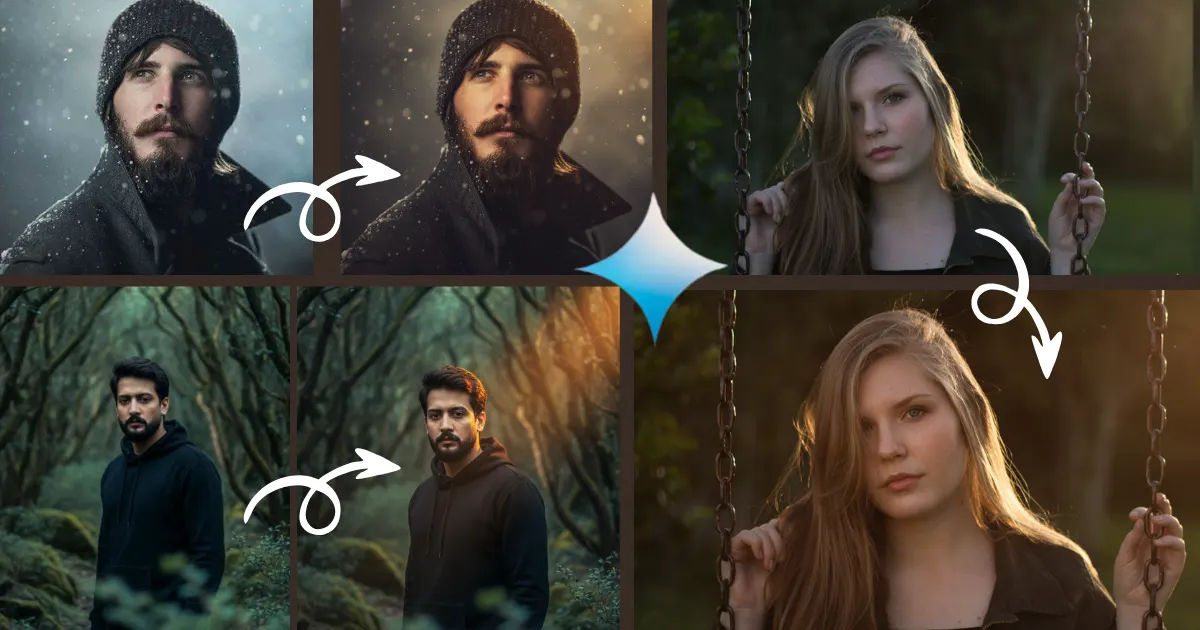
Have you ever looked at your photo and thought it’s missing that “wow” factor?
Well, this Gemini prompt to add dramatic cinematic lighting gives your image the emotion depth, and looks like a movie scene within seconds.
It may be a portrait, travel shot, or your pet’s photo, this simple AI trick transforms your flat image into a visually stunning masterpiece.
The best part is its 100% free and it takes a few seconds.
Now, let’s uncover how you can create lighting worthy of a blockbuster, without touching a studio light.
How to Add Dramatic Cinematic Lighting in Any Image Using Google Gemini AI
Let’s start with the basics cinematic lighting concept you get in many photo editing apps as filters or brightness enhancer.
When you use the Gemini prompt to add dramatic cinematic lighting in any image, you’re teaching AI to paint with shadows and highlights.
It is not just color but creates a mood — mystery, romance, power, or serenity — in the same frame.
Prompt 1

Convert this image into a 8k cinematic image with golden-hour lighting and rich visual depth. Add soft natural sunlight that creates warm amber highlights and gentle shadows, giving the scene a dreamy, film-like glow.

Also read
Google Gemini Prompt for Cinematic Double-Exposure With Your Childhood Photo (opens in a new tab)
Google Gemini Prompt for Cinematic Double-Exposure With Your Childhood Photo: Your childhood photo isn’t just a memory. Now-a-days, Using AI,…
Apply professional cinematic color grading — warm golden tones in the highlights, deep earthy browns and oranges in the midtones, and cool teal shadows for contrast.
Enhance natural textures and details while keeping a soft, smooth, and realistic finish.
Adjust brightness and contrast to create a balanced light falloff with subtle vignetting that draws attention to the main subject.
Make all colors more vivid yet natural, with greens appearing lush and slightly desaturated for a realistic film look.
Ensure the subject’s surfaces or skin appear gently illuminated, textured, and radiant. Add a shallow depth of field, soft bokeh background, and a touch of atmospheric haze to achieve a nostalgic, cinematic, 8K-quality mood — as if captured by a high-end DSLR camera with a vintage lens.

Also read
Subho Mahalaya Greeting Card in ChatGPT: Bengali Message Text Prompts (opens in a new tab)
Mahalaya is not an ordinary day, it is a special day, and it is incomplete without a Subho Mahalaya Greeting…
Prompt 2

Convert this image into a cinematic 8k realistic DSLR portrait with warm, glowing light and deep contrast. Add a soft, golden spotlight or sunset-like illumination focused on the main subject, creating natural highlights on the face and clothes while keeping the background darker and smoother. Apply rich color grading with warm amber and orange tones in the highlights, deep shadows with subtle teal or brown hues, and balanced midtones for depth. Enhance the subject’s texture, clarity, and details while maintaining a dreamy softness. Slightly desaturate background colors to make the subject stand out. Add gentle atmospheric glow, soft vignetting, and warm bokeh light around the edges. Create a dramatic, moody, and cinematic look as if captured with a high-end DSLR using 8K film-quality lighting.
Also read
1980 AI Image Prompts: Create 80s Bollywood, College & Couple Photos (opens in a new tab)
This blog brings to you free copy-paste 1980 ai image prompts and anyone can easily create realistic images within 10…
When your photo makes viewers feel something, it automatically gets more engagement, like a skyrocket.
That’s why this Gemini trending photo editing creators and photo editors love prompt.
A perfect lighting in an image reveals the story with captions like “Every shadow hides a secret.”
The story doesn’t end here — it deepens with every edit.
Step by Step Adding Cinematic Light Effects on Photos Using Google Gemini Prompt
You can flow the steps with the help of Gemini prompt to add dramatic cinematic lighting, and convert your photo becomes a magnet for attention.

Also read
This blog post reveals 20+ Mahalaya poster design prompts for boys and girls’ images on a single page, and you…
Follow the steps to convert flat images into a cinematic visuals within few seconds.
- Alt first login in Gemini AI with Gmail ID.
- Upload image to Gemini.
- Enter your lighting prompt from any above.
- Click on + icon and add the image that you want to add light effects
- Now, click on rin button and wait for some times.
Within few moment your image or your Youtube thumbnail get the realistic lighting effects.
Conclusion
The Gemini prompt to add dramatic cinematic lighting in any image isn’t just a trend, it shows your photo editing skills and creativity.
It helps you master cinematic photo light effect without gear, or long editing hours.
This blog reveals a few words of prompts , you can control the mood, depth, and magic of lights in your visuals.
Now anyone can turn ordinary frames into film-worthy moments.
So, next time when you need to add light on photos like a pro level of photo editor, just back to this page.
Just bookmark this cinematic lighting prompt, and watch your pictures glow like scenes from a movie.
Because in the digital realm, light isn’t just illumination — it’s storytelling.
FAQs
Q1. What is the Gemini prompt for cinematic lighting?
A: It’s a text description you feed into Google Gemini (or its image-editing model) instructing it to apply dramatic, film-style lighting (shadows, highlights, mood) to an image.
Q2. How do I write a good prompt to add cinematic lighting with Gemini?
A: Include photography-style terms like “dramatic backlight”, “rim light”, “cinematic shadows”, “35 mm lens”, “moody lighting””), specify the subject, mood and environment.” etc.
Q3. Can Gemini edit my uploaded photo to add cinematic lighting?
A: Yes — You upload your photo, then apply a prompt describing the desired lighting effects; Gemini’s image-editing model handles the rest.