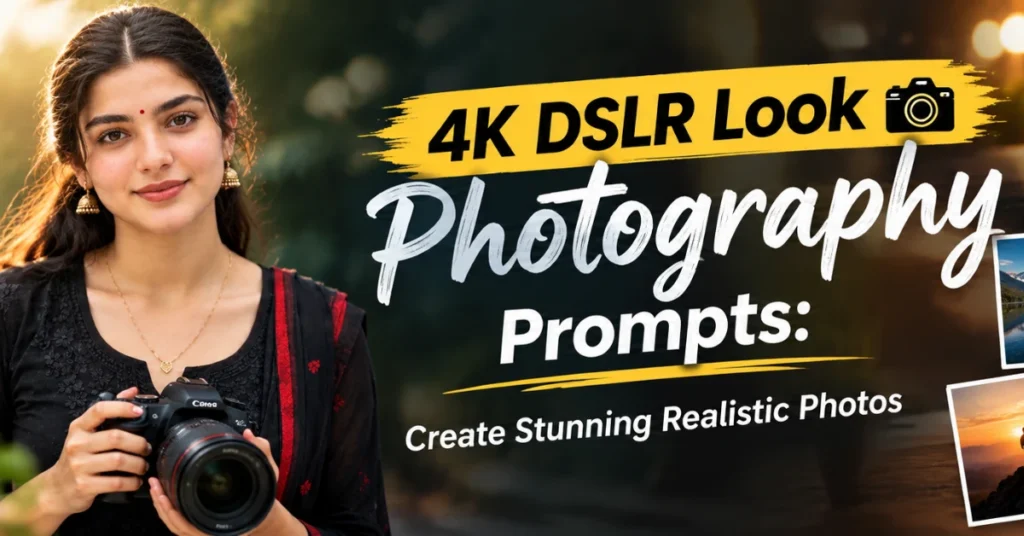
4K DSLR Look Photography Prompts: This blog article will turn an ordinary image into a professional-looking 4K DSLR-style photograph.
Are you looking for realitic 4K realistic photo prompt for AI?
Now anyone can add cinematic atmosphere, or subtle bokeh in their ordinary images.
Are you ready for professional composition with natural and DSLR camera looks.
I can assure you, these given 3 prompts can transform your normal images into realistic photography with natural colors.
Are you ready for authentic textures and DSLR-inspired depth images?
Let’s dive into the real world of DSLR-look images with next-level prompts designed to deliver sharp details, natural tones, and stunning realism.
4K DSLR Prompts for Cinematic Photos
If you are looking for 4K DSLR Look Photography Prompts to create stunning realistic photos, all these free prompts can help you.
Now using these prompts anyone can achieve a professional camera-style appearance with natural lighting, and realistic details.
You can use your basic featured cell phone and capture the photos adn after that you can add the depth of field and cinematic background blur in just one click.
Also read
The Selective Color Effect is a photo editing style which is trending over the social media platforms and internets. The…
Best part is you can user these prompts in ChatGPT or Gemini or any other image generating AI platforms.
We have tested all these multiple times on these tools and after that revealed on this article.
How to Make AI Photos Look Like DSLR Photography?
You can follow the given steps to get the realistic camera photography using these prompts.
- First , open the website or mobile app of ChatGPT on your pc or mobile.
- Go to login page and login with Gmail user name or password.
- After the login , open another website- www.photoeditprompts.in on a new tab
- Now click on to search icon and type ‘4k dslr look’
- After that , open the first link and slowly scroll down
- Copy the prompt that you like by clicking ‘copy’ button
- Now, back to chatgpt app or website and paste the prompt
- Click on + icon and select the your image and attached it with prompt
- Hit or press the run button and ChatGPT will takes 1015 seconds to convert the image into a realistic camera proofesional photography.
If you try this, I am sure you will forget to use the software like Photoshop or Lightroom.
Best 4K DSLR Look Photography Prompts
You can discover the 3 best 4K DSLR-look photography prompts to create stunning, and ultra-realistic images.
All these output images includes sharp details, natural lighting, and cinematic depth including professional camera quality.
Any user who wants stylish fashion shots, or travel photos, or any social media visuals can use these prompts.
Now it is your time to captured images with a high-end DSLR camera looks.
Give your ordinary photos a professional camera look with sharp details and soft cinematic background blur.
Your 4K DSLR Look Photography Prompts are just one click ahea , just click it and grab it.
4K DSLR Look Wedding Photography Prompt
The given prompt is showing the best wedding 4K DSLR Look Photography.
These 4K DSLR Look Photography Prompts are designed to help you create realistic, and professional-looking images.
Now, you can add sharp details, or natural skin tones including balanced lighting on your images.
You are creating portraits, or outdoor scenes including cinematic images.
These prompts can give your AI-generated photos within a few clicks.
You must try once the DSLR-inspired appearance without requiring professional photography equipment.
So, anyone can use the benefits of advanced camera knowledge using this prompts.
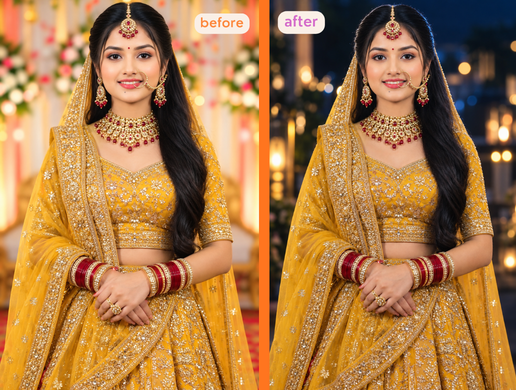
Transform the attached input image into a premium 4K cinematic night photograph while keeping the original subject completely recognizable and naturally photographed. IMPORTANT — SUBJECT PRESERVATION: Use the attached image as the primary source image. Preserve the subject's exact identity, facial structure, face shape, eyes, eyebrows, nose, lips, jawline, hairstyle, hair length, skin tone, body proportions, clothing, jewelry, pose, hand position, camera angle, perspective, framing and overall composition. DO NOT redesign or regenerate the person. DO NOT change the person's face. DO NOT beautify or reshape facial features. DO NOT make the person look like a different model. DO NOT change the saree, blouse, jewelry, hairstyle or accessories. DO NOT alter the pose or body proportions. Keep the original image composition and subject placement intact. ENVIRONMENT TRANSFORMATION: Convert the original daytime environment into a sophisticated cinematic nighttime setting. Create the appearance of a professionally photographed night portrait with a dark atmospheric background, subtle urban/environmental depth, distant out-of-focus lights, soft practical lights and beautiful cinematic bokeh. The background should become significantly darker than the subject while remaining realistic and naturally connected to the original environment. Preserve the recognizable architectural/environmental structure where possible, but reinterpret its illumination as nighttime. LIGHTING: Create professional high-end cinematic lighting similar to an expensive DSLR night portrait. Use a soft, controlled key light illuminating the subject's face and clothing naturally. Add a subtle cool blue nighttime ambient light throughout the environment. Add a soft warm-neutral fill on the subject's skin so the skin remains natural and healthy rather than blue. Create a subtle bright rim/backlight around the subject's hair and shoulders, producing delicate hair-edge separation from the dark background. Add realistic atmospheric reflections and soft highlights. Create distant practical lights in the background with strong but natural circular bokeh. Use realistic light falloff: - subject = properly exposed - immediate background = darker - distant background = progressively darker - practical lights = glowing but not blown out - shadows = deep but still containing detail LIGHTROOM / PROFESSIONAL COLOR GRADING: Make the final image look like it was professionally edited in Adobe Lightroom by an experienced cinematic portrait photographer. Apply: - controlled exposure - balanced highlights - deep but detailed shadows - rich blacks without crushing facial detail - subtle HDR tonal control - refined contrast - natural skin-tone correction - slightly cool blue/cyan nighttime shadows - gently warm skin highlights - muted cinematic colors - subtle highlight roll-off - soft filmic tonal transitions - professional color separation - realistic saturation - subtle clarity - controlled texture - delicate sharpening - clean micro-contrast - natural lens rendering Create a sophisticated teal/cool-blue nighttime environment with warm natural skin tones, but keep the effect subtle and photographic rather than heavily stylized. SKIN: Keep the person's real skin texture and natural complexion. Preserve pores and fine facial details. No plastic skin. No excessive smoothing. No artificial whitening. No beauty-filter appearance. Skin should have realistic cinematic exposure with soft dimensional highlights. HAIR: Preserve the exact hairstyle and hair volume. Add subtle blue-white rim light along selected outer strands where naturally appropriate. Individual hair strands should catch realistic backlight without becoming artificially glowing. CLOTHING: Preserve the exact clothing design, fabric texture, colors and embroidery. The fabric should respond naturally to the new nighttime lighting. Maintain realistic folds, shadows and highlights. BACKGROUND LIGHTING: Create an elegant cinematic night background featuring: - deep blue-black ambient atmosphere - distant city/environment lights - soft white and warm practical lights - realistic circular bokeh - subtle reflections - gentle atmospheric haze - depth separation - natural light bloom The background lights should appear physically believable, as if photographed with a professional full-frame DSLR/mirrorless camera using a fast portrait lens. CAMERA LOOK: Premium full-frame cinematic photography. 85mm portrait-lens aesthetic. Approximately f/1.4–f/2.0 depth of field. Sharp subject. Soft natural background separation. Beautiful optical bokeh. Realistic lens falloff. High dynamic range. Natural perspective. Professional exposure. CINEMATIC MOOD: Elegant, sophisticated, romantic nighttime portrait. Premium Bollywood/Indian fashion photography aesthetic. Expensive commercial photography quality. Natural, realistic and photographic — NOT fantasy, NOT artificial AI art. FINAL IMAGE QUALITY: Ultra-photorealistic. 4K cinematic detail. Professional Lightroom-quality color grading. Professional exposure correction. Realistic skin texture. Natural facial detail. Clean shadows. Controlled highlights. Beautiful night ambience. Subtle cinematic contrast. Premium DSLR image quality. CRITICAL RESTRICTIONS: Do not change the person's identity. Do not change the face. Do not change the pose. Do not change body proportions. Do not change clothing. Do not change jewelry. Do not add people. Do not remove important objects. Do not distort hands or fingers. Do not create extra fingers. Do not create duplicate accessories. Do not replace the subject. Do not make the image look AI-generated. Do not overdo the blue color. Do not overexpose the background lights. Do not apply excessive glow or HDR. Do not use cartoon, fantasy, illustration or CGI styling. The final result should look like the SAME ORIGINAL PHOTOGRAPH was captured at night by a professional photographer and then expertly color-graded in Adobe Lightroom — not like a newly generated image.Professional Camera Look AI Prompt
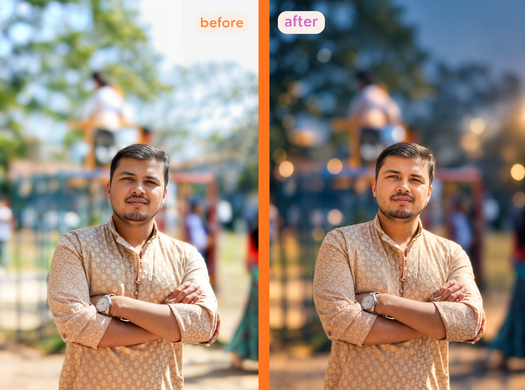
Yes — the key is to lock the original background completely and ask for lighting/color treatment only, with stronger depth-of-field blur. Use this prompt: Use the attached image as the exact source photograph. Preserve the entire original background, environment, architecture, objects, colors, composition, perspective and spatial arrangement exactly as they appear. DO NOT replace, redesign, regenerate, reconstruct or invent a new background. Apply all requested cinematic photo effects to the same original background only. Convert the existing environment into a sophisticated nighttime atmosphere while keeping every recognizable background element in its original position and structure. Make the background significantly darker, moodier and more cinematic, with subtle cool blue nighttime ambient light, realistic warm practical-light illumination and tasteful distant bokeh. Increase the background blur substantially using a realistic professional 85mm–105mm portrait-lens look around f/1.4–f/1.8. Keep the subject extremely sharp and naturally detailed while the original background becomes smoothly defocused with creamy optical bokeh. Preserve recognizable shapes and colors underneath the blur; do not replace them with new scenery. Add professional cinematic exposure, deep but detailed shadows, controlled highlights, realistic light falloff, subtle atmospheric haze, natural lens bloom and refined teal-blue shadows with warm skin tones. Most important: this is an EDIT of the original photograph, not a new image generation. The subject, face, clothing, pose, hands, jewelry and original background must remain the same. Only lighting, color grading, atmosphere and depth-of-field blur may change. Ultra-realistic professional DSLR photography, 4K detail, natural skin texture, realistic optical bokeh, premium Lightroom-quality finish. No new objects, no new scenery, no background replacement, no artificial AI look.DSLR Looks Cinematic Prompt
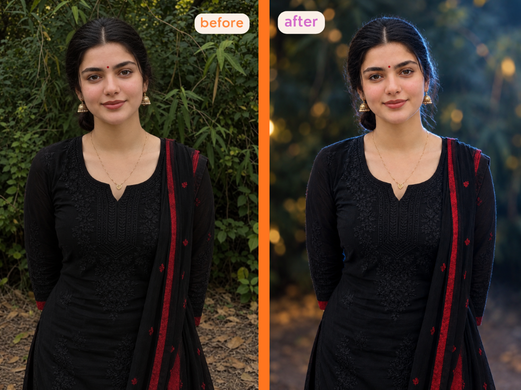
Use the attached image as the exact source photograph. Preserve the subject and the entire original background, environment, objects, composition, perspective and spatial arrangement. DO NOT replace, redesign or generate a new background. Apply cinematic lighting and color grading to the same original photograph. Keep the original environment recognizable but transform its illumination into a sophisticated nighttime atmosphere with deeper shadows, cool blue ambient tones, warm practical lights and elegant natural bokeh. Increase background blur substantially with a realistic 85–105mm lens, f/1.4–f/1.8 look. Keep the subject extremely sharp with natural skin texture while the original background becomes creamy, smoothly defocused optical bokeh. Add a distinct but realistic cool blue-white cinematic rim/backlight behind the subject, especially tracing the outer edge of the hair around the back and sides of the head, with a delicate extension along the shoulders. The rim light should create beautiful separation from the dark background without glowing artificially. Add very subtle cinematic atmospheric fog/haze primarily in the background, softly catching blue and warm lights and creating depth. Keep it transparent, smooth and realistic—not smoky or dense. Apply professional Lightroom-style exposure, controlled highlights, detailed shadows, natural warm skin tones, cool blue shadows, subtle lens bloom and filmic contrast. This is an EDIT, not a new image generation. Do not change identity, face, clothing, pose, hands, objects or background structure. Only lighting, color, atmosphere and depth-of-field may change. Ultra-realistic 4K DSLR quality, natural optical rendering, no artificial AI look, no excessive blue, glow or HDR.FAQs
Conclusion
There no doubts these AI photography prompts are perfect for generating beautiful portraits.
I hope all these above 4K DSLR Look Photography Prompts will satify your images.
You can trend your images on social media using these prompts.
The a single photography that goes next level viral step on Instagram if you use any one prompt from the above.
So, Get ready with old photos but convert them with natural tones, light, brightness and stunning realism.
Make any portrait look naturally photographed with detailed facial features and balanced lighting, even if you don’t have a camera or understand realistic lens depth.
Also read
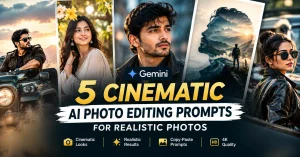
Cinematic AI Photo Editing Prompts for Epic Bollywood-Style Portraits (opens in a new tab)
You must try these cinematic AI photo editing prompts to express action poster look. This prompt transforms an ordinary portrait…