If you are looking for a modern invitation video card, you must read this blog post on how to make a wedding invitation video 2026 – Best Gemini AI Prompt guide.
In the beginning, you must remember that the process may take a little bit of time to get a realistic
wedding invitation card in video format.
However, this blog helps you with a beginner-friendly, step-by-step method to start creating a professional, high-quality wedding video card.
The best part is that modern invitation ideas are not easily available on the internet because most websites are selling their templates of AI wedding invitation videos.
But honestly, on this page, we explore a simple way to create a modern wedding video card.
So, let’s dive into the blog post and convert your imagination into a smart, creative, and professional wedding video card.
How to Create a Wedding Invitation Video
AI wedding card video generators are trending nowadays and this can save the time and money.
Earlier, people had to spend hours on Photoshop or Adobe Premiere Pro to create wedding invitation cards.
Even professional Indian designers are now creating Indian wedding invitation video AI cards.
Because it saves time and provides realistic visuals that maintain 100% facial features of the bride and groom.
First, you need to copy the prompt from the given section and execute it on the Gemini website.
The Google Gemini Nano Banana will give you a realistic wedding card image based on the prompt you have copied.
Now, it is your time to copy or download the image and convert it into a wedding invitation video.
For this, you can use websites like Grok.com or Kling AI to create your digital wedding video card.
All the steps are described in the Gemini AI prompt for wedding invitation video section.
How to Use Gemini AI for Wedding Invitation Video
Now, anyone can follow the given steps to create a realistic wedding invitation card video.
The Gemini AI prompt for the wedding invitation video is given below.
Wedding invitation with a textured off-white linen background and soft green botanical accents at the corners. At the top, in an elegant dark green serif font:
“WITH THE BLESSINGS OF OUR FAMILIES
WE REQUEST THE HONOUR OF YOUR PRESENCE
AT THE WEDDING CELEBRATION OF”Below, in large bold burgundy serif letters:
“ARJUN & KAVYA”
Underneath, event details in smaller green text:
“SATURDAY, AUGUST 20TH, 2025 AT 7 O’CLOCK IN THE EVENING
SHRI GANESH WEDDING LAWN
INDORE, MADHYA PRADESH”Centered below is the word “VENUE” in bold green, followed by address details:
“PLOT NO. 10, C/C.A, SCHEME NO. 94,
SECTOR C, SCHEME 94,
INDORE – 452010”The lower half features a romantic photo of an Indian couple standing back-to-back, holding hands — the woman dressed in a red and gold saree, the man in a red kurta and white churidar — set against a softly blurred garden backdrop with red flowers. Overlaid on the image in elegant white cursive script:
“Save The Date”
After executing the prompt on the Gemini website, you will get an image.
An elegant “Save the Date” wedding invitation featuring a soft beige watercolor background, beautifully accented with large, hand-painted cream and mauve florals along the top and bottom edges. At the upper right, in flowing brown script text:
“Join us, together with our beloved friends and family,
as we celebrate the wedding of our family.”Centered below, in ornate brown cursive lettering:
“Arun Raj, B.E
Weds
Meera Lakshmi, M.Sc”Beneath this, in delicate handwritten-style script:
“Save the Date”
The event details appear below in a clean, elegant serif font:
**“Engagement
Saturday, September 14th, 2024 | 6:00 PMWedding Ceremony
Sunday, September 15th, 2024 | 9:00 AM – 10:30 AM”**The venue is listed underneath:
“Venue
Sri Balaji Thirumana Mandapam,
Plot No. 45, Anna Nagar Extension,
Kovilpatti Road,
Madurai District, Tamil Nadu”At the lower left, a full-length photograph of the couple is softly blended into the floral background — the groom (keep the same facial features from this image 1) wearing a silky bright red shirt with dark black trousers, and the bride ((keep the same facial features from this image 2) dressed in an elegant teal saree, both smiling warmly, adding a romantic and personal touch to the invitation.
Next, take this image to a website that converts images into videos.
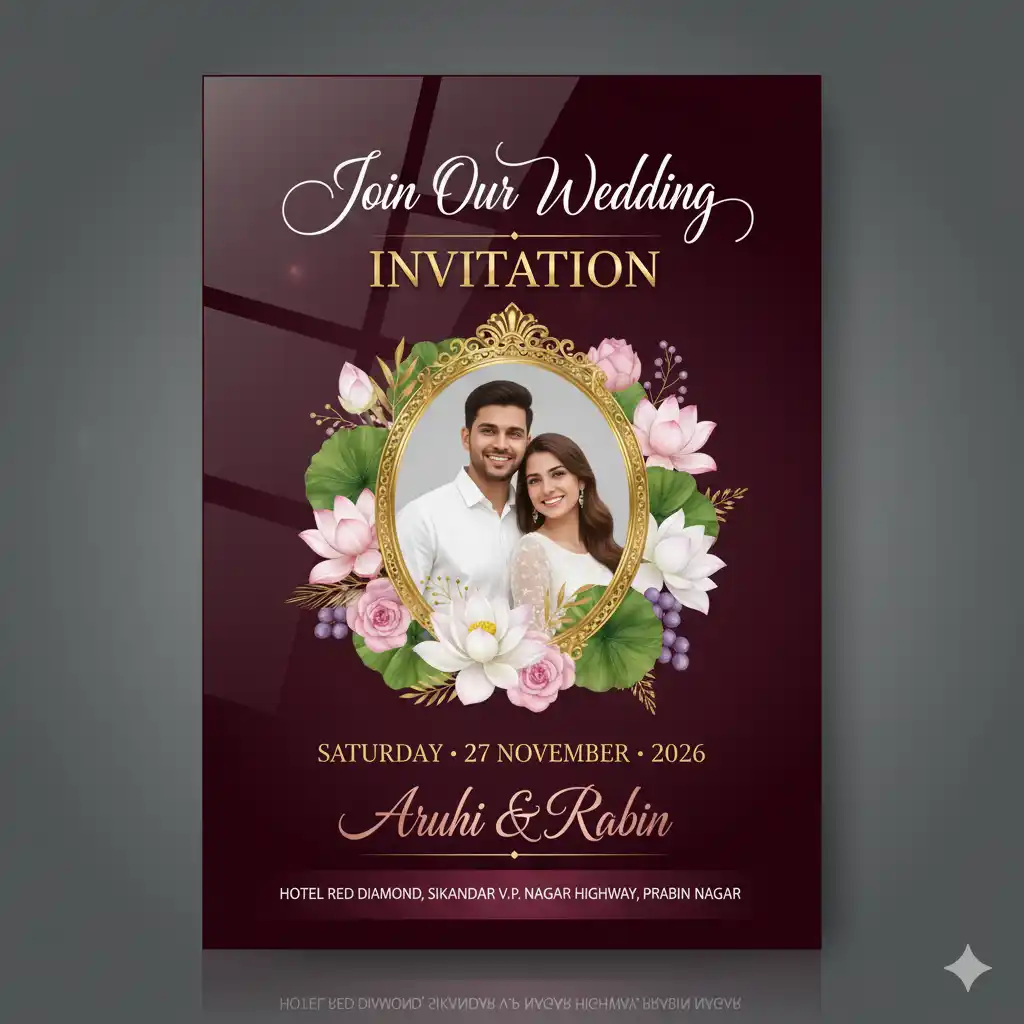
An ultra-realistic Indian wedding invitation featuring a deep burgundy-to-maroon glossy gradient background, finished with a mirror-polished lacquer effect and subtle light reflections that create a rich, high-end sheen. The surface shows soft specular highlights, gentle color depth, and refined vignette shading, giving the invitation a premium luxury-card appearance.
At the top, in opulent flowing white calligraphy with long ornamental flourishes, elegant ligatures, and hand-lettered precision, the text reads:
“Join Our Wedding”
Directly beneath it, “INVITATION” appears in bold uppercase serif lettering, crafted with raised gold-foil embossing, soft metallic glow, micro-bevel edges, and realistic shadow depth that interacts naturally with the glossy surface.
Centered below, a romantic portrait of the smiling couple — the groom dressed in a crisp white shirt, the bride with soft brown hair and natural makeup — is placed inside an ornate oval frame with high-gloss gold detailing. The frame is richly adorned with a luxurious botanical arrangement featuring white and blush-pink lotus flowers with layered petals, fresh green lotus leaves, subtle golden foliage, accents of soft pink roses, and refined clusters of muted purple berries, illustrated in a hyper-realistic watercolor-meets-digital paint style with natural depth and highlights.
Beneath the frame, the event date is displayed in an elegant gold serif font, rendered with polished metallic foil texture, reflective highlights, and embossed depth:
“SATURDAY · 27 NOVEMBER · 2026”
Below the date, the couple’s names — “Aruhi & Rabin” — are written in luxury rose-gold calligraphy, featuring a decorative ampersand with extended swashes, refined stroke contrast, and a soft metallic shimmer that reflects the glossy background. The names are delicately underlined with thin gold lines, adding balance and sophistication.
At the bottom, a deep maroon glossy banner with subtle reflection carries the venue details in clean white sans-serif typography, ensuring clarity while maintaining the upscale aesthetic:
“HOTEL RED DIAMOND,
SIKANDAR V.P. NAGAR HIGHWAY,
PRABIN NAGAR”The entire composition is enhanced with realistic reflections, controlled specular highlights, soft shadows, and premium print realism, blending modern luxury, Indian floral symbolism, and high-gloss wedding stationery elegance.
Also, do not forget to paste the video prompt from this website, which will help you convert a wedding image into a wedding video.
Wedding Invitation Video Prompt
Animate this single wedding invitation image into a cinematic luxury video. Keep the camera completely static, no zoom, no pan, no shake. The background remains fixed. The groom and bride remain still with no body or head movement; only add a very subtle natural smile enhancement on both faces, soft and realistic, no exaggerated facial motion.
Animate all text elements one by one in an elegant sequence:
- ‘Join Our Wedding’ gently fades in with smooth calligraphy stroke reveal
- ‘INVITATION’ appears next with a soft gold shimmer and light emboss glow
- Event date text fades in with a refined upward ease motion
- Names ‘Aruhi & Rabin’ animate with graceful cursive writing effect and slight metallic shine
- Venue text fades in last with clean, minimal motion
Text animations are slow, smooth, luxury-style, with easing curves—no bouncing, no fast motion.
Glossy burgundy-to-maroon gradient background maintains realistic reflections and specular highlights. Gold foil elements subtly catch light. Lotus florals remain static with no movement.
Overall style: premium Indian wedding invitation video, elegant, cinematic, high realism, soft lighting, 4K quality, luxury stationery animation.”
An elegant animated wedding invitation video with a luxurious pink and gold aesthetic. The scene opens with a soft gradient pink-to-cream backdrop framed by flowing white satin curtains on both sides, with shimmering silver tinsel strands gently falling vertically from the top like delicate rain. At 0.2 seconds, the text ‘We request your gracious presence for the wedding of’ fades in at center in refined dark serif font. At 1.2 seconds, the names ‘Rajeev and Priya’ animate in sequentially — ‘Rajeev’ appears first in bold burgundy cursive script, followed by ‘and’ in smaller gray font, then ‘Priya’ in matching burgundy cursive — all centered beneath the opening line. Simultaneously, clusters of deep magenta flowers with green leaves gracefully cascade down from the top corners, settling along the upper frame. At 3.2 seconds, the date ‘on 23rd November, 2025’ fades in below the names in matching burgundy script. At 5.2 seconds, the venue ‘at S. R. Halls, Mumbai, India’ appears beneath the date in dark gray serif font. Throughout the animation, a stylized illustration of the couple — the woman in a golden embroidered lehenga, the man in a black sherwani — gently fades into view at the bottom center, standing before an ornate stage decorated with cascading crystal beads, golden floral cutouts, and lush magenta flower arrangements. Subtle floating sparkles drift upward across the entire frame, adding magical motion. The final composition remains static from 6.2 to 14.2 seconds, with continuous gentle shimmer and sparkle effects enhancing the romantic, celebratory atmosphere.”
Image to Video Prompt for Wedding Invitation
Create an elegant 5-second animated Indian wedding invitation video with a luxury pink and gold aesthetic. Use a soft gradient background transitioning from blush pink to warm cream. Frame the scene with flowing white satin curtains on both sides. Add delicate silver tinsel strands falling vertically from the top like soft shimmering rain. Camera remains completely static.
0.0 – 0.5 seconds:
Fade in the text ‘We request your gracious presence for the wedding of’ at center in refined dark serif font, smooth fade, no bounce.0.5 – 1.8 seconds:
Animate the names sequentially beneath the line:
– ‘Rajeev’ fades in first in bold burgundy cursive
– ‘and’ appears next in smaller neutral gray serif
– ‘Priya’ follows in matching burgundy cursiveSimultaneously (0.8 – 2.0 seconds):
Deep magenta floral clusters with rich green leaves softly cascade from the top left and right corners and settle along the upper frame, slow and graceful.2.0 – 2.8 seconds:
Fade in the date ‘on 23rd November, 2025’ below the names in elegant burgundy script.2.8 – 3.5 seconds:
Fade in the venue ‘at S. R. Halls, Mumbai, India’ beneath the date in dark gray serif font.Throughout (1.5 – 5.0 seconds):
A stylized illustrated couple gently fades into view at the bottom center — woman in a golden embroidered lehenga, man in a black sherwani — standing before an ornate wedding stage with cascading crystal beads, gold floral cutouts, and lush magenta flowers.Add subtle floating sparkles drifting upward, soft glow highlights, and gentle shimmer on gold elements only.
3.5 – 5.0 seconds:
Hold the full composition static with continuous soft sparkle and shimmer.Style: cinematic, romantic, premium Indian wedding invitation, luxury motion design, smooth transitions, high realism, 4K quality.”
All these prompts are customizable, including dress color, dress style, names, date, and message, as per your needs.
Tips for Creating an Indian AI Wedding Invitation Video Card
You can try these Gemini AI prompts and design your perfect wedding invitation video without any technical skills.
- First of all, you need to log in to the Gemini AI website.
- You can log in using your Gmail account.
- Once the login is completed, copy the prompt from this site.
- Next, move back to the Gemini website and paste the prompt,
- Then click on the plus icon and attach the bride and groom images. ( Make sure that both images have good facial features.)
- After that, hit the Run button.
Gemini will give you a realistic wedding card image.
If you are not satisfied with the image, you can change the prompt text or even the dress details.
Now, open an account on Kling, Hailuo, or Grok websites.
After that, attach the new Gemini AI wedding card image.
Then, go back to the website or blog post and copy the video prompt.
Finally, paste the prompt on any of the above websites.
You need to wait for a few seconds, and your realistic Gemini AI wedding video card will be ready.
Lastly, you can download and share it with your family and friends.
Conclusion
This blog gives you golden tips to create an AI wedding invitation video card within a few seconds.
As a result, you can avoid spending hours on video editing software.
Moreover, you do not need to hire any professional video editor to create your video card.
Just with the help of a few simple steps, you can create your own realistic wedding card masterpiece.
Those who are looking for a perfect wedding invitation card in video format must try these tips.
I hope this smart way of creating a beautiful wedding invitation video will give you a memorable experience.
Write in the comment section what you would love to use next with an AI video editor.
FAQs
Obviously, you can use these prompts from this blogpost and create a no watermark wedding card images or videos
You can make a wedding invitation video in Canva, but it has some limitations. That’s why you can try these prompts and image-to-video generator websites instead.
Yes, you can create birthday cards to wedding cards on gemini ai using prompts. The good part is it is 100% free till date.