5 Stunning Gemini AI Flower Dress Prompts Every Girl Needs to Try Today

What if your next AI portrait looked like it stepped straight out of a Paris runway—crafted entirely by Gemini AI?
Most people still use generic AI fashion prompts!
But those who understand texture layering, floral symmetry, and color emotion can create breathtaking 8K portraits that feel alive.
Can a digital flower dress feel more “real” than silk?
When I first typed “AI flower dress” into Gemini, the results were flat.
Then I added “sunlit lace petals, pastel fabric fusion, cinematic depth”—and it changed everything.
Use this prompt to turn any ordinary model shot into a jaw-dropping, editorial-grade floral masterpiece.
Gemini AI Flower Dress Prompts are redefining how girls express creativity online—mixing digital artistry with high-fashion elegance.
If you’re ready to transform your virtual lookbook, here are five show-stopping ideas you must try today.
Let’s dive into the depth of Google Gemini AI prompts for girls floral or flower dresses.
How to Use Floral Dress for Women Using Google Gemini AI
Creating AI flower dress ideas with Google Gemini is simpler than it looks—but the magic lies in the details.
To begin with, open Gemini’s image generation mode and describe your concept clearly.
Use sensory language: mention the lighting, mood, texture, and movement.
For example, phrases like “soft dewdrop shimmer” or “sunlit chiffon folds” evoke stronger visual coherence.
Furthermore, balance composition and realism.
A good Gemini AI portrait prompt includes not just the dress but the story it tells—where it’s worn, how it moves, and what emotion it carries.
Gemini AI Flower Dress Prompts Ideas for Girls
AI can now mimic petal translucency better than real camera lenses.
This isn’t your typical digital art—Gemini’s adaptive lighting engine reads fabric folds and light refraction like a pro photographer.
Ever wondered why some AI portraits seem to glow from within?

A creator in my AI community used this floral-light fusion technique—and her post hit 1M+ views overnight.
Prompt 1
Create an ultra-realistic 8K cinematic close-up portrait with volumetric light, shallow depth of field, filmic tone mapping, high contrast, glossy finish, smooth bokeh, and dreamy aesthetic. Keep the same facial features from this image. A young woman framed by dense pink cherry blossoms, wearing a blush-pink or champagne strappy gown with sparkly embroidery, golden chain, and flowing sheer skirt. Her wavy light-brown hair catches soft light, with a single drop earring visible. She gazes gently over her left shoulder, lips slightly parted, bathed in soft daylight and pastel pink hues, evoking serene, luminous elegance.Recreate that ethereal “inner glow” with one simple tweak in your Gemini prompt.

Ready to turn your everyday look into an enchanting masterpiece?
Imagine stepping out in a dress composed entirely of vibrant, AI-designed floral art—capturing instant admiration and likes everywhere you go.
Prompt 2
An ultra-realistic, 8K cinematic portrait featuring filmic tone mapping, volumetric lighting, glossy finish, shallow depth of field, smooth bokeh, and precise color grading. The centered full-body shot depicts a young male adventurer (retain the same facial features from this image) standing on a narrow jungle path of reddish-brown soil surrounded by dense, lush tropical greenery. He wears a brown fedora, light olive-green shirt, dark brown cargo pants, and matching leather boots. A large brown backpack rests on his back, with a black notebook open in his left hand, pen in right. Sunbeams pierce through overhead foliage, casting a warm, mystical glow.
Now, you can unleash an enchanted garden look that feels both magical and attainable.
Digital artists and influencers are raving—this isn’t your grandma’s floral print!

Have you ever wished for a dress that looks like it was conjured by a fairy godmother yet feels uniquely yours?
Prompt 3
Create an 8K ultra-realistic cinematic full-body portrait with volumetric light, shallow depth of field, filmic tone mapping, high contrast, glossy finish, smooth bokeh, and surreal fashion aesthetic. Keep the same facial features from this image. A woman stands gracefully against a solid teal-blue background, wearing a strapless gown with a white textured bodice and a massive lotus-like floral midsection flowing outward like angelic wings. The sheer pleated teal-blue skirt drapes elegantly. Her hair is in a neat bun, subtle makeup, drop earrings, and warm smile. Soft studio lighting highlights white petals and skin glow, blending purity with serene elegance.
My best friend used AI to visualize her ‘secret garden’ party outfit; the resulting orchids and vines were so lifelike, guests were zooming in on every detail!
You’ll get instant engagement and personal style credibility by using this Gemini AI outfit inspiration prompt—plus,
you’ll be in on the latest trend before it goes mainstream.
Prompt 4
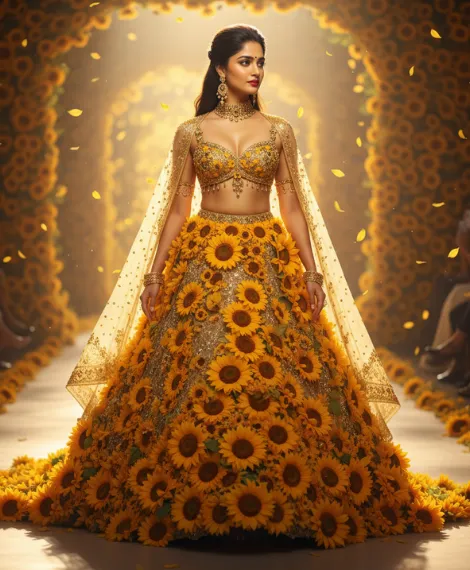
Create an 8K ultra-realistic, cinematic full-body runway shot with volumetric light, shallow depth of field, filmic tone mapping, high contrast, glossy finish, and smooth bokeh. Keep the same facial features. A woman walks gracefully, slightly off-center left, wearing a fantasy couture two-piece sunflower outfit — a bralette adorned with gold beading and a voluminous skirt covered in dense sunflowers. Her long dark hair is tied back; she wears gold jewelry, a choker, arm chains, and a sheer golden veil. Bright golden-hour sunlight glows from the left, illuminating falling petals and vibrant yellows. Background: sunlit runway, blurred audience, sunflower tunnel.
A recent survey found that over 60% of #AIart posts with floral motifs see double the average comment count compared to regular fashion posts.

This golden sunflower dress will make your profile pop like never before.
In a digital world crowded with sameness, nothing catches the eye like a bold AI-crafted burst of yellow sunshine.
Prompt 5
Create an 8K ultra-realistic, cinematic full-body portrait with volumetric light, shallow depth of field, filmic tone mapping, high contrast, glossy finish, and smooth bokeh. Keep the same facial features from the reference image. A young woman stands centered amid endless rows of pink roses, framed by soft greenery and blurred depth. She wears a voluminous, strapless hot-pink gown with tiered ruffles and a large rose detail at the waist, long wavy dark brown hair, and a delicate tiara with drop earrings. Warm golden-hour sunlight falls from behind-left, adding gentle highlights and glow. Background: rose pathway fading into soft golden light.
For instance, I tried the ‘sunflower statement’ prompt on Gemini AI for a summer event—strangers kept asking for the designer, never guessing it was all virtual!
Conclusion
When all is said and done, Gemini AI Flower Dress Prompts are more than tools—they’re creative passports to your next viral masterpiece.
Whether you want ethereal cherry blossoms, bold sunflowers, or mystical garden gowns, Gemini empowers you to design your fantasy look in seconds.
Over and beyond that, these prompts help you craft authentic self-expression through fashion that feels futuristic yet deeply feminine.
So, open Gemini today and start creating your digital couture moment—you might just inspire the next global trend.
FAQs
What is Google Gemini AI and how do I use it for fashion-style image prompts?
Google Gemini is an advanced AI model that allows you to generate or edit visuals by inputting descriptive prompts. When you want a fashion-style image (like a flower dress look), you describe outfit, pose, lighting, background, mood, etc.
Why do some Gemini prompts work better than others?
Because good prompts include specific descriptors for style, lighting, setting, mood and subject. Vague prompts tend to produce generic or “off” results.
Can I keep the same face when generating a fashion/flower dress image with Gemini AI?
Yes — many creators specify “keep the same face as reference” in their prompts, so the AI retains facial features while changing outfit, background, or lighting.
What kind of backgrounds, lighting and colour tone are trending for these AI-fashion prompts in 2025?
Trends show: warm golden-hour lighting or soft diffused studio light, cinematic filmic colour grading (rich but smooth tones), shallow depth of field (blurry background), and minimal or elegant settings so the outfit is the focus.





[…] AI is one of the best platforms that can convert your own image into a realistic and fantastic, scroll-stopping masterpiece within […]
Your article helped me a lot, is there any more related content? Thanks! https://accounts.binance.bh/register/person?ref=GGYHGRE
Can you be more specific about the content of your article? After reading it, I still have some doubts. Hope you can help me. https://www.binance.bh/register?ref=GGYHGRE
A tattoo idea becomes easier to discuss when it is broken into clear choices: subject, line weight, shading, placement, scale, and the amount of open skin around it. An AI tattoo generator can be useful at this early planning stage because it gives people visual directions to compare before an artist is asked to draw anything permanent. The most helpful output is not a finished tattoo, but a focused reference set that makes preferences and constraints easier to explain.
A structured interview should make it easier to distinguish a well-written resume from evidence of actual judgment. The useful sequence is to identify the most important claim, ask for a concrete decision or trade-off, then define what a credible answer would include. RoleProbe frames that work around the job description and the candidate’s own statements, which can help interviewers compare answers consistently without turning the conversation into a rigid script.
HR guidance is most useful when it helps a manager turn a broad obligation into a concrete next step. For example, resources on recruiting, performance conversations, and compliance can be more actionable when they clarify the decision to make, the records to keep, and the questions that require local professional advice. A well-organized directory also saves time by letting teams compare approaches before committing to new processes or tools. Folio HR offers a practical entry point for teams looking for that kind of structured, plain-English support.
The most valuable editing step is often structural rather than cosmetic. A draft becomes easier to use when its main idea appears early, supporting points are grouped logically, and transitions show why each section matters. An AI text humanizer can support that process by helping writers move from generic phrasing toward clearer, more intentional language without treating the first output as final copy.
Counting Japanese text is not always just about meeting a character cap. Line and paragraph totals can help reveal structure, manuscript-page equivalents make editorial targets easier to interpret, and byte counts matter when text is copied into systems with encoding-based limits. 文字数カウンター brings these checks into one real-time view, including UTF-8 and Shift_JIS measurements. That combination is particularly useful for reviewing a draft before submission, while local browser processing keeps the text on the user’s device rather than sending it elsewhere.
Content planning often becomes fragmented when research, drafting, review, and publishing live in separate tools. A more useful approach is to treat them as one connected decision process: identify topics that fit the existing site, turn the selected topics into editable drafts, and publish only after an accountable review. RankOps AI is relevant to that model because it focuses on the handoff points where quality can be lost. Keeping those stages connected also makes it easier to revisit a decision later, refine a draft, or adjust priorities as search demand and business needs change.
[…] Here are some carefully designed Happy Independence Day 2026 image prompts, which you can try with modern AI image-generation […]
The useful distinction here is between something that looks empty and something that contains a valid Unicode code point. An invisible character can be helpful when a field requires content but a visible mark would be distracting. A browser-based generator with a length setting and a test step makes that choice easier to inspect before copying. It also encourages people to check the destination’s rules, since platforms may normalize, remove, or reject particular characters rather than treating every blank-looking value the same way.
Confusing app behavior is easier to investigate when people can record what happened immediately before the issue: the action taken, the screen shown, any error text, and whether the same result occurs again. This turns vague app problems into details that can be checked systematically. Good guidance should also flag which steps are reversible, so users can troubleshoot without accidentally losing work or changing unrelated settings.
A simple timer can make short work blocks feel more intentional without adding another account or complicated setup. The most useful version is one that lets people set hours, minutes, and seconds quickly, then pause, resume, or reset when plans change. An audible finish is also practical when attention is on a different task. A clean browser-based online timer keeps the focus on the work rather than on managing the tool.
A clean list depends on more than adding a visible mark before each line. The character should match the surrounding typeface, maintain even spacing, and remain understandable when copied into another editor or device. A bullet point symbol can be a better choice than improvised punctuation when the content is meant to scan quickly, because it gives readers a consistent visual cue without introducing extra words.
Japanese writing often has two separate limits to check: the visible character count and the encoded file size. A tool that also reports lines, paragraphs, 400-character manuscript pages, UTF-8 bytes, and Shift_JIS bytes makes those requirements easier to review in one place. 文字数カウンター is especially useful when a submission or publishing workflow specifies more than one of these measures. Local browser processing is also a sensible fit for draft text that should remain on the device.
Small notation details can create unnecessary friction when someone needs to move between a document, a webpage, and technical markup. Approximately Symbol is most useful when it keeps the character itself, its encoding, and the surrounding usage guidance together. A compact comparison with related relation marks also helps prevent choosing a visually similar symbol that carries a different meaning. Clear copy-and-paste options make a reference like this practical for students, writers, and developers alike.
A clearer brief can make a tattoo consultation much more productive: reference images, placement, scale, spacing, and the elements that must remain distinct all give an artist something concrete to discuss. Patchwork Tattoos can be useful during that early planning stage, especially for comparing composition ideas before settling on a direction. The generated concepts should remain references rather than final instructions, leaving room for the artist to assess skin, flow, longevity, and their own interpretation.
A useful conversion page should make the permitted-use boundary clear while keeping the basic task uncomplicated. An audio converter can be most helpful when it lets someone paste an allowed link, choose a sensible output option, and retrieve the resulting MP3 without moving through several unrelated screens. Before converting, users should confirm that they have the right to use the source material and check the selected format and quality so the downloaded file suits its intended playback device.
Many support articles become more useful when they define the symptom precisely before listing fixes. An export that produces an empty file, for example, needs different checks from one that never starts or stops at a certain percentage. Good guidance on export failures can separate file-format limits, storage permissions, browser behavior, and account restrictions into clear branches. It should also say which details to capture—error text, file type, and the point of failure—so a reader can make an informed next step instead of retrying blindly.
A useful document tool does not need a complex setup to solve a narrow problem well. PDF gratis online can be meaningful when it covers the essential step of shrinking a document while avoiding registration barriers. The privacy detail is equally important: browser-side processing means users can consider a smaller-file workflow without automatically sending the document elsewhere. Clear, limited-purpose tools like this can fit well into everyday sharing and submission tasks.
Scanned documents need a little more care than ordinary text PDFs because recognition quality affects every later edit. For clear English pages, scanned pdf to markdown conversion can provide a practical first draft for review, cleanup, and reuse in a Markdown-based workspace. Keeping that conversion in the browser is also a straightforward way to avoid sending a document to an application server, while removing the friction of account setup for a one-off task.
A practical recognition tool should make uncertainty manageable instead of pretending every input has one obvious answer. With hum to search, it helps to treat the returned matches as a shortlist: replay the memorable section, compare melody contour and tempo, then use any lyric fragments or context to narrow the result. Support for humming, whistling, recordings, and uploaded clips is especially useful because people often remember a tune without knowing which form of audio will be clearest.
A practical music lookup tool should make imperfect input feel useful rather than demanding a precise recording. hum to search supports several starting points, including humming, singing, whistling, recording, and uploaded clips, which is helpful when only part of a tune is remembered. Presenting likely matches clearly and allowing a quick retry can turn a vague musical memory into a manageable search task.
A conversion tool becomes more useful when the output can move easily into another task. text to morse code is helpful for drafting labels, puzzles, study cards, or short signals, especially when the result can be copied, played back, and saved without requiring an account. Pairing that workflow with a readable alphabet reference also helps users catch a mistaken character before sharing or printing the result.
Academic tools are most useful when they make planning more transparent rather than adding another source of confusion. An attendance calculator can help students estimate how different attendance scenarios affect their planning, while course notes and question collections can be sorted into a revision checklist. It is still important to verify attendance records, grading rules, and deadlines through official course channels. Using a simple tracker alongside these resources can make it easier to notice gaps early.
Useful SRMIST study resources should make it easier to move from broad course requirements to an actionable revision list. A clear approach is to check the syllabus, collect the relevant notes, and use previous year questions only after outlining the concepts they test. Keeping a small tracker for completed chapters and attendance can make deadlines and academic requirements more visible without adding unnecessary complexity to an already busy semester.
Readability often improves when each paragraph has one job: introduce a point, explain it, or show why it matters. Editing with that rule makes it easier to remove repeated ideas and replace vague transitions with specific ones. The result should still sound like an informed draft rather than a string of polished but interchangeable sentences. An AI text rewriter can support this stage when the output remains editable and subject to a final fact check.
A useful SEO process should make the handoff from research to publishing visible and reviewable. RankOps AI frames that work as a connected sequence: identify site-relevant topics, turn selected ideas into editable drafts, then review content before it reaches a connected site. That structure can help teams avoid treating keyword lists and article production as separate, untracked activities. The practical value is not automatic publishing by itself, but keeping editorial judgment present at each approval point.
Small and midsize teams often need guidance that is clear enough to use immediately, especially when hiring processes, pay administration, and people policies begin to overlap. Folio HR is most useful when resources distinguish between a checklist for getting started and the situations that call for professional legal, tax, or employment advice. Plain-language templates paired with brief explanations of the decision behind each step can help teams build consistent habits instead of collecting documents they do not understand.
Finally found a site that actually treats players right. The bonuses at xjilicom are legit and easy to claim.
Sizing a UPS is more reliable when wattage is treated as a starting point rather than the entire answer. List each essential device, use its expected power draw, leave sensible headroom, and then compare the desired runtime at that load. An UPS wattage calculator can organize the arithmetic, but outlet types, battery replacement options, and the shutdown plan also affect whether a unit fits the situation.
A sensible UPS plan starts by separating critical gear from everything else. Networking equipment, storage, and the primary workstation may need backup power, while printers, speakers, and other high-draw accessories often do not. That smaller essential load can improve available runtime and make the purchase easier to size. Before choosing a model, use a UPS wattage calculator with the rated wattage or measured draw of each device, then allow a margin rather than selecting at the limit.
The detail “Most people still use generic AI fashion prompts!” makes the article’s point concrete. What limitation or newer example would you add today? Disclosure: I work on
this Halloween game guide — an independent Halloween: The Game reference.
I paused at “What if your next AI portrait looked like it stepped straight out of a Paris runway—crafted entirely by Gemini AI” because it identifies a specific decision rather than a vague best practice. Pairing it with “Now, you can unleash an enchanted garden look that feels both magical and attainable” also makes the trade-off clearer. A short follow-up showing where the advice fails would strengthen the article further.
To be transparent about my connection, I contribute to idea validation tool.