

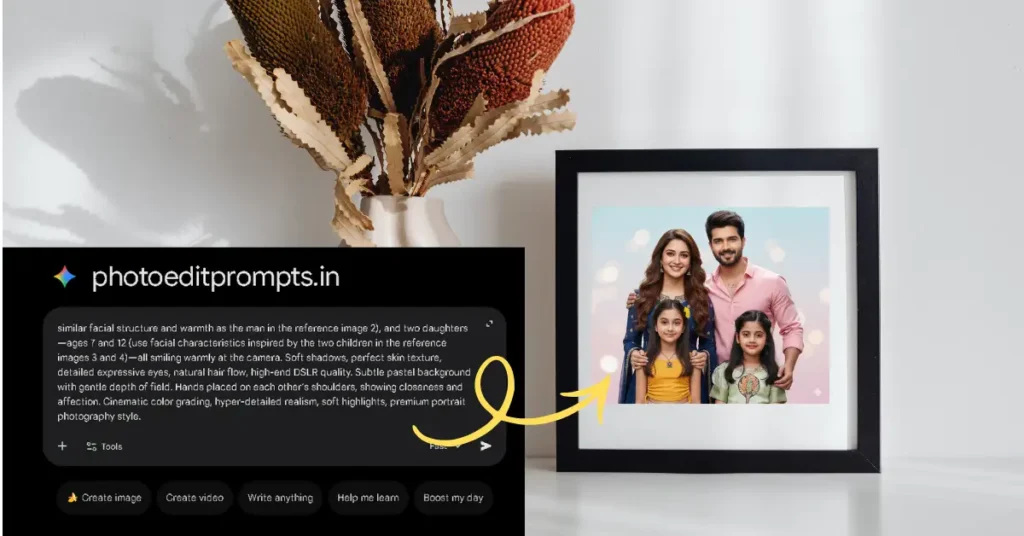
Welcome to photoeditprompts.in. Do you want to know how to generate family photos using Google Gemini AI?
If you are looking for truly realistic family ai photos, you can read this blog and get the 5 best family photo prompts in this blog.
One of my friend share me this prompts that he collected from a professional AI expert of USA.
Believe me, the results are mesmerizing your old memories and freeze the good moments of the family members in one frame.
That’s because this tool isn’t just another AI model. It’s a powerhouse designed for creators and photographers.
Do you want stunning 8K visuals without hiring a studio or buying expensive gadgets?
Let’s drive into the world of Gemini AI photo editing prompts and turn simple ideas into picture-perfect, or cinematic 8K portraits.
Why Google Gemini AI Is Changing Family Photography
I’ve spent years working with AI tools and image generating on AI ,
and trust me—the realism, and perfect visual are possible if you know the tips of writing a good prompt.
This blog is a prompt guider for beginner and you’re generating holiday 8K portraits, or multi-generation family shots makes easy.
Scroll down and copy any prompt to recreating old pictures using Google Gemini Ai photo editing tool.
here are the main key points that makes Gemini AI number onne photo editing tool:-
- 1. Ultra-Realistic 8K Output
- Natural Lighting & Skin Tones
- Context-Aware Generation
- Re-Generate for Variations
- Refine With Details
How to Generate Family Photos in Gemini
As a matter of fact, many people searching How to Generate Family Photos and they are not getting the
perfect matching facial features on visuals.
But, a perfect Gemini prompt can deliver lifelike lighting, and natural expressions, with 100% same skin tones in AI photos.
You’ll get images that feel close to home, if your family AI images include the authentic, warm, and
emotions using no photo editing filters of any app.
The following steps you can follow for AI generate an image in Gemini AI:-
- 1. Open the Gemini AI website
- 2. Login with your Gmail account
- 3. Go to the Nano Banana section and click on it.
- 4. Now paste the prompt from this website
- 5. Click on + icon and add all the family members’ photos as per the prompt sequence.
- 6. Finally, tap or hit the ‘RUN’ button
Within a few seconds, your realistic almost 100% facial features matching stop scrolling image will generate.
Prompt 1- Family with five members
Create a hyper-realistic 8K Indian family portrait in a 9:16 vertical ratio with follow details and conditions
Mother ( take the facial features from reference image 1) and father ( take the facial features from reference image 2) sitting naturally on a sofa.
Two brothers (take the facial features from reference image reference image 3 and reference image 4) and one sister ( take the facial features from reference image 5) standing behind them in a relaxed, natural pose.Use all reference photos that I will provide.
Keep each person’s face 100% exactly the same as in the reference photos. No changes to facial structure.
No changes to skin tone.
No changes to eyes, nose, lips, or expressions.
No changes to wrinkles, age details, or natural imperfections.
No beautification, smoothing, or artificial edits on any face.
Maintain 95–100% similarity to original real facial features.
Do not change their: clothes
outfits
colors
jewelry
hair style
overall look
Everything must match the reference photos exactly.Lighting must be soft, natural indoor home lighting (real family-photo style).
Background should look like a real South Indian home, including: simple wall
curtains
sofa
natural family setting
No studio backgrounds, no overly edited or artificial elements.
All the subjects poses should feel natural and comfortable, not stiff or forced.
Expressions must stay exactly as in the reference photos.
Prompt 2 – Family with two sons
Our nest prompt reveals the family photo with father, mother and two brothers in one frame.
Create an ultra-realistic 8K,cinematic lighting, 8K detail, volumetric light, shallow depth of field, color grading, filmic tone mapping, high contrast, glossy finish, smooth bokeh family portrait of four people standing close together, warm and joyful expressions, natural lighting. A mother (take the same facial features from image 1), father (take the same facial features from image 2), and two young boys (take the same facial features from image 3 and image 4) smiling warmly at the camera. Soft shadows, perfect skin texture, detailed eyes, natural hair flow, high-end DSLR quality. Subtle pastel background with smooth depth of field. Hands gently placed around shoulders showing closeness and affection. Cinematic color grading, hyper-detailed realism, soft highlights, premium portrait photography style.
Prompt 3 – Family with daughters
A family with a single daughter can use this prompt for a family photoshoot.

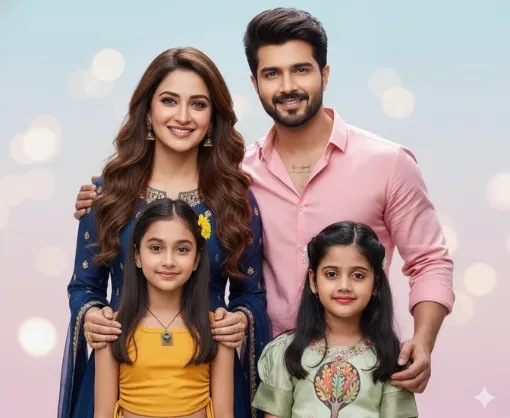
Ultra-realistic 8K, cinematic lighting, 8K detail, volumetric light, shallow depth of field, color grading, filmic tone mapping, high contrast, glossy finish, smooth bokeh. A family portrait of four people standing close together, warm and joyful expressions, natural lighting. A mother (use similar facial style and softness as the woman in the reference image), a father (use similar facial structure and warmth as the man in the reference image), and two daughters—ages 7 and 12 (use facial characteristics inspired by the two children in the reference image)—all smiling warmly at the camera. Soft shadows, perfect skin texture, detailed expressive eyes, natural hair flow, high-end DSLR quality. Subtle pastel background with gentle depth of field. Hands placed on each other’s shoulders, showing closeness and affection. Cinematic color grading, hyper-detailed realism, soft highlights, premium portrait photography style.
If anyone has 2 or 3 daughters, they can also use the same prompt just adding the addition of details.
Prompt 4- Family with daughter
Create an ultra-realistic 8K, cinematic lighting, 8K detail, volumetric light, shallow depth of field, color grading, filmic tone mapping, high contrast, glossy finish, smooth bokeh. A family portrait of four people standing close together at a picnic spot, warm and joyful expressions, natural outdoor lighting. A mother (use similar facial style and softness as the woman in the reference image 1), a father (use similar facial structure and warmth as the man in the reference image 2), daughter (keep facial features from image 3), all smiling warmly at the camera. Soft shadows, perfect skin texture, detailed expressive eyes, natural hair flow, high-end DSLR quality. Gentle greenery and soft sunlight in the background with subtle depth of field. Hands placed on each other’s shoulders showing closeness and affection. Cinematic color grading, hyper-detailed realism, soft
Prompt 5- Family with grandma, mother and daughter
Ultra-realistic 8K, cinematic lighting, 8K detail, volumetric light, shallow depth of field, color grading, filmic tone mapping, high contrast, glossy finish, smooth bokeh. A family portrait of three people standing close together inside a traditional Indian rural mud house, warm and joyful expressions, natural soft indoor lighting. A grandmother (keep the facial features from image 1 ), a mother (use similar facial style and softness as the woman in the reference image 2), and one young girl (use facial inspiration the reference image 3), all smiling warmly at the camera. Soft shadows, perfect skin texture, detailed expressive eyes, natural hair flow, high-end DSLR quality. Earthy clay walls, traditional rustic textures, and subtle ambient glow in the background with gentle depth of field. Hands placed lovingly around each other showing closeness and affection. Cinematic color grading, hyper-detailed realism, soft highlights, premium portrait photography style.
Conclusion
Now, you no need to buy any AI courses or license for Photoshop,
because this blog reveals 5 best family photo editing prompts that give you the realistic images within one click.
Now, anyone can feel like images came straight out of a professional DSLR.
The best part is you can customise the prompts as per your needs.
Write in the comment section, which prompts you like most and why.
FAQs
You need to describe your family, setting, lighting, and style—Gemini creates 8K portraits instantly.
Yes. It offers studio-quality lighting, natural skin tones, and sharp details.
Gemini generates ultra-realistic images up to 8K clarity.
Absolutely—Gemini can regenerate and upscale old images beautifully.